Showing posts with label blended learning. Show all posts

Thursday, February 16, 2017

Not sweating the small stuff....

Today, I had both of my Design and Visual Communication senior classes. On of them is a mix of NCEA Level 1, 2 and 3 and the other is a mix of NCEA Level 2 and 3. So... lots of fun to be had (!!!)

The double session this morning was Level 1, 2 and 3.
Level 1 were producing thumbnail sketches of possible poster layouts to showcase the work of a chosen architect. We went over the 3 elements they were going to worry about for these thumbnails - the image (just draw boxes), the title (rough where it is going) and the written information (a series of lines in the pace where the writing would go).
Level 2 were working in small teams to produce mood boards about design eras to show to their client. They had started this yesterday so the first thing we had to do was sort out the students who were absent yesterday and didn't have a team. We ran a little auction to see who was going where. Cue printing off loads of pictures, cutting and sticking and mess everywhere.
Level 3 are drawing from observation from their chosen starting point for the first external standard.

During all of this, one of my Level 1 girls decided to show everyone what a good magician she was and started poking pencils through a bag of water.
Here is a shot of one of the boys posing with the masterpiece....


I decided to take a walk round the room with my phone to make a short video.

What you might see is level 1 and 2 students wandering round looking like they are off task and the Level 3 student on his phone. 
You might think this video looks bad. 

What you don't see is the fact that Level 2 students are working in teams and need to move round the room to get resources and use equipment. They are also really good at supporting each other with tasks that they get stuck with.
The Level 3 student has been working practically solidly without a break at his drawings for nearly a double period. He was taking a very short break at the time.
I had just changed the focus for the Level 1 students so they had to think about the shapes and forms form their architect in the poster layouts. This disrupted their flow and they were getting back down to it.


This afternoon, the Level 2 boys went to see their client with their final mood board. Feedback is to be shared with all of them when they got back. Emphasis was made on them being  TEAM mood boards and not personal ones. The same with the feedback write ups.

When the boys first went to their client for the initial interview, we decided to do an audio recording instead of everyone frantically scribbling notes.
We then got very excited when we discovered that my phone made a text file that goes with the audio recording. That was until that file was shared in the class community and it made absolutely no sence at all!!
Example :-

OK so they pulled read the free but the phone .... For Go to tell you right good good question to stop What kind of products cause we got a big list of products ....

So.. that plan went out the window today.

We then discovered that the audio files could be uploaded to Google Drive, but not embedded onto their portfolio sites.
The students then had the good idea of SoundCloud. This then rang a bell in my head that I had a SoundCloud account from a while ago...


So...the take out from today's seniors lessons ?

When elements in the lesson go a bit custard coloured, the students are really good at suggesting ideas if you keep them in the loop about what you were planning and what had gone wrong.

Just because it looks like chaos, well.. it probably is a bit, but the back story is a good one and needs to be made clear to anyone who wants to judge at first glance.

Friday, November 28, 2014

MIT 14 Final Presentation

Today we had our final session for MIT 14 at the wonderful Spark building.
We all completed our final presentations, summing up our projects for the year.

Here is mine....


Monday, September 15, 2014

Ako Tamaki - Feedback

I have sent staff at Tamaki College a Google Form on Friday asking what they think of the Ako Tamaki Site.
This was the the request :-

Hello
As part of my Manaiakalani research this year into blended learning, I had the idea of making a website where the students make resources to teach other students. ( kind of like a Tamaki Khan Academy).
I had a group of students out yesterday to start putting together some ideas so we could present it to you as an idea.

Here is the site that we made :-


There is still work to add to this from what we did yesterday and there are still videos to make for English and Science.

Could you please take a look and see what you think?
I need to add feedback and thoughts to my research....

Here is a Google Form to fill in with your feedback.
Thanks very much


Here is the reply spreadsheet that came from that from :-
Link here


  • There is a general interest in the idea of a site like this for the students at Tamaki College. Some staff are happy to make resources for this site themselves with their students, others are not so comfortable doing that.
  • There is concern that the content on the site is as accurate as we can make it with no mistakes.
  • There is a general thought that the action of making the resources will help those students making them and that students will listen to each other more than the teacher at times.


Verbal feedback has included :-

  • The quality of some of the resources is low.
  • The interest os some of the resources is not as high as others.
  • More interesting tone used in the verbal information is needed on some of them.

Overall, the experiment was a success with lots of interest in continuing this idea. I appreciate the more "negative" aspects of the feedback even though this first try was more of a "concept sketch" than a finished product. It needs lots of development work and the feedback gives some direction for this to go in.

Thursday, September 11, 2014

Ako Tamaki

When the students get their netbooks re-imaged, part of that image is a shortcut to the Khan Academy. This is a great online learning space where students can learn about all sorts of topics.
It got me thinking. Can our students create their own "academy" where the leaners become the teachers of the following year?
In a bid to start exploring this idea, I took one of my Manaiaikalani days today and had a varied selection of students out of class creating videos centred on teaching something to someone who knows nothing about the topic.
I have had discussions with the HODs of all the subject areas so they could choose a couple of students for each area. They had to make sure that they came with the subject knowledge that they needed to get across as I would be no help there.

I made a couple of examples myself, to show them 1 or 2 ways they could use if they wanted to, but these were in no way the only ways I wanted them to work today.

The first method I showed them was the sticky note method. I was quite happy with this method as I had experimented on my Maths class a couple of weeks ago.


The second method was similar but using drawn, coloured and cut out elements.


After showing the group the two methods, showing them the site that I had set up to present it all on and arming them with an iPad for the day, we were off.

Some students were happy to use the methods I had shown them and stayed in the room and worked on that. Others wanted more live action shots and either took themselves away for filming or shouted at everyone to be quiet when they needed to. Some went and sat on the stairs to get some quiet for making screen casts.

Here are some photos from the day....


It took them a while to get going this morning, planning on paper first about what ideas they could do and what script they would need to say.
Once they got started on the filming, there was no stopping them. They were frustrated at first by the "no editing" rule, but soon got used to the idea of it all being done in one take. We kept them nice and short, so any do overs were not taking for ever to do.

I am still in the process of uploading the student's videos that they made today onto the site.

My plan is to present this to the whole staff and get some feedback from them as to what they think and if they think it is an idea that could move foreword.
I am seeing this as a long term view in regards to seeing the benefits. The videos that are being made now will only be used next year when the students new to the topic are needing this information. The bonus for the students making the videos now though, is that this process cements the knowledge into their heads.

We had a great time today making these videos and as a little bit of silly as we left the room, we positioned the funky shaped furniture into a particular pattern.


Saturday, August 30, 2014

The Power of the Sticky Note...

Last Friday, I sat in on the annual Manaikalani Hui. One of the items that we watched during the day was the Digital Immersion programme for teachers who are in the first year of working in a 1 to 1 classroom environment. They had been making videos about their teaching as enquiry journeys, using sticky notes as a method to cover the content in a step by step way. Thanks to +Fiona Grant for pointing me in the direction of her blog post about this.

I decided to have a go, as I happened to have a box full of LOADS of sticky notes,  and I decided to use my lovely Year 10 maths class as experimental subjects.
I didn't make one in advance and decided on having my first go in front of the whole class, so they could see the process and stuffing it up half way through was not the end of the world.
We had just been solving equations in algebra, so the topic for the movie was to explain how to do this.

Here is my video. Not too bad for holding my phone with one hand and driving the sticky notes with the other hand.


I got the students to work in pairs so they could rely on each other for maths knowledge and for understanding what they were doing.

Listening to the conversations while they worked was fascinating. They were talking about the Maths and working out how to break it down between them.
Arguing over who was going to do the voice over was common and one team got round that by typing in their explanation into their chrome book and getting it to speak!!

What was interesting to watch was the process. A couple of tries was needed, showing me in between times to see how they were doing. One team got confused with their voice over twice, so I decided on the second attempt that the feedback would not come from me but from the rest of the class. I played it to them all with the instructions for "constructive feedback ". They were good at that and could see where the explanation needed changing to make it make sense.

Here is the link to their blog, so you can see their completed movies, and some photographs of the process. I love the fact that some teams have found their own way of doing it and not just blindly copied mine and I also love how much Maths literacy was having to happen to accomplish this.

Friday, August 22, 2014

Presenting at the Manaiakalani Annual Hui

Today, all the MIT 14 group got together at Tamaki College where we were presenting to everyone at the annual Manaiakalani Hui about what we have been researching into this year.
My presentation got an overhaul for the occasion.

Here it is .....


Here is the link if you want to see the speaker notes.

Wednesday, August 6, 2014

Changing the Focus

My Level 1 Design and Visual Communication class have recently started their last project. They get to design a mobile phone. The standard that this is geared towards is AS91068 - Undertake development of design ideas through graphics practice.
As the focus of this standard is the development part of the design project, I have decided that the research and brief development can be done as a group, using Google Plus Communities and GAFE products. How they would normally approach this would be the standard way of everyone doing their own research and brief development with no input from each other. I want to see what will happen of I change the focus this year so the students get the experience f working on a project together and producing their own individual elements to be assessed.

We talked as a whole class about how many different types of mobile phone there are and then I split the class in to groups. One group was in charge of finding images of different types of mobile phones and uploading these images onto the class Google Plus Community for everyone to share. The whole class then had to go onto the community and make comments on / analyse these designs based on :-

  • How easy do you think the design is to use?
  • What kind of things can you do with this type of phone?
  • What do you think the weakest part of the design is?
  • Do you think the phone is aimed at a range of ages / people or do you think it is aimed at specific type of person?
  • What kind of materials do you think are used in the design?
  • What makes the design stand out from the rest on the shelf in the phone shop?


The other group was in charge of producing the Google Form questionnaire to send to their client. We had already done a whole class activity where we all fed into one Google doc with ideas for questions to ask their client. A wide variety of useful and not so useful ideas came out.
As you can see from the revision history, we had a good whole class input into this.


The questionnaire team had to decide which questions were important and present them in the form of a Google Form to send to the client. They are lucky enough to be working with Pip who works at Telecom to be their client. This is a new experience for them to work with someone else and someone else's design needs and expectations. I don't normally introduce design students to this way of working with someone else until they are at Level 2 or 3, so we are going to be using the Google Plus community to communicate and share with our client a lot as they are used to using this.


Here is the questionnaire that was sent to their client. We decided to send one from the whole class instead of lots from individuals asking similar / the same questions.


The class have all been making 3D plasticine models based on the description "comfortable shape". They had to focus on that and not worry about the fact that we are designing phones just yet. Photographs were taken as they made each one. Link to the album here. We sat all together and looked at the photographs on the board / projector and decided as a group which were the most important points that came out from all of the shapes that they made. This small list will then be included in the specification list :-
  • simple, curves, rectangular proportion, size in the hand, grip
It has been a new way to work for this project this year. I have done it this way so that their individual focus and time is going to be spent on where the credits are aimed, which is the development of the designs and they can work together on the elements that are not going to be assessed.

Tuesday, August 5, 2014

Why we Love to Cheat in Maths

I have recently been given the gift of a Year 10 Maths class. Their teacher left to work in another school, so after having relief teachers for a while, they came to me full time.
It has been definitely a different challenge for me to work online with a subject that is not my own.
I decided straight away to make my own Maths Google Site rather than use the one that the class teacher had already made. That would be like using someone else's planning and not doing it myself. If I was going to be invested in this class and how they were doing, then I needed to do it myself.
Link to their class site is here.

The work we are doing at the moment is algebra and we are onto multiplying and dividing powers.
The first thing that we did for this was to design Super Heroes.
Here are some links to some great online apps to do this :-


Hero Machine Link 1
Hero Machine Link 2

We posted these Super Heroes on the class blog as they were making them.

Here is an example of one of the Heroes that they made.


The next task was to use these Super Heroes in a battle, so they need to be given their powers.
The students helped me to put together this battle zone on a Google Drawing.


They were not not happy when we first made it as there was only 6 Super Heroes to choose from. So they made ( and found ) more!!

To play the game, you use the random number generator on the site to choose 2 opponents on each team. They then have to work out who would win.
The Super Heroes are multiplied together so the powers have to be added.
Later, they had to throw the "dice" again - 1 for multiplying, 2 for dividing, to add to the algebra use.

The random number generator on the class site was supposed to stop the cheating, so of course they found new ways to cheat.
As they had to make a copy of the battle ground in order to use it, they had control of the power numbers. Team powers were changed so that they would definitely win the battle.
This is great cheating, as knowledge of the algebra skill we were covering has to be in use for the cheating to work. I love it!!

The example here shows how the student put his on one side with a wildly exaggerated power with all the others on the other side... his working out is faultless....


Monday, May 12, 2014

Blended Learning and the effects on a Secondary Timetable

As part of my blended learning research this year, I am interested to know what kind of effect this type of learning has on the timetable and planning in a secondary school context.
I have interviewed Mr Harris, Deputy Principal at Tamaki College, in charge of timetabling. I sent him the questions a couple of weeks ago so he knew what I was going to ask him.

These are the questions that we covered ( along with a few extras along the way ).

  • What do you see as the main issues with the timetable as it stands at the moment?
  • How do these issues affect the planning  of a whole school timetable?
  • What is your understanding of blended learning?
  • Have you seen blended learning in action at any other school?
  • Were there any timetable considerations with what you have seen?
  • When the wireless in the community is up and running, and nearly all students will therefore have internet access at home,  do you see more of an opportunity for blended learning to have an impact on timetable planning?
  • What do you see as the main stumbling blocks / sticky areas with a blended learning model with regards to timetable planning?
  • There are definitions of types of blended learning here - Link
  • Do any of these models make timetable planning easier? ( bearing in mind, we still have to cater for trades, junior school and intermediates, who need a more traditional model ).
  • I see DVC as blended due the the different types of activities that we have to do, both online and on paper.
  • Do you see all subjects in the school like this or are some more able to be totally digital and others not?
  • How does this affect the planning of a timetable to cater for these differences?
  • This link here is to a totally online Level 1 course that I am trialling this year.
  • Link to Site
  • I am trialing it with a group of Year 10 students.
  • If there were more online course opportunities like this, how do you see this affecting the timetable?
  • What are the positive and negative affects that this could have?
  • Do you ever see a time when the students determine the timetable for themselves, going to see teachers when they need to for specific skills and content and for discussion time during a course where most of the “facts / content” is online?
  • Do you think that this approach is too “mature” for our younger students?
  • How do you see that a secondary timetable is going to have to evolve to keep up with the changes in how content is being taught?


What the main points were :-

  • What, where, when and who ?
  • What is going to be best for the students and the way that they learn?
  • How much change can happen while the end assessment is still as it stands with NCEA and we have to prepare students for that reality?
  • Being prepared for a future where we don't know what it will be like, as things are always changing. Wireless in the community will be a bog step in this change, as our expectations of the students ability to work outside of school hours will be different.
  • Being OPEN to change and being able to adapt and cater for what the students needs.
  • Teachers work at different rates, styles and times so we need to expect and cater for students in the same way.
  • Will students come in for those skill sessions that they need, and have a more flexible timetable at other times? What will that flexible arrangement look like?
  • Yes, he does see a time when students are dictating the timetable, but when that will be is unclear in the present state of things.
  • As more students come through from primary and intermediate having gone through this style of teaching, their ability to cope with a more open time table will improve, so the "maturity" factor will not be relevant any more.
  • Each subject has different requirements, and topics within a subject has too, so a one size fits everything will not be the way to go, but a flexible approach will be necessary.


Here is the recording of the interview ( please excuse the small chat at the start !! The main section starts about 50s in... )

Sunday, April 13, 2014

Quality Feedback to Aid Planning...

While designing the online course trial module, it was definitely a different planning experience. I tried hard to think of all possibilities so that I could make resources to cover every thing.
The trial module went live today and one of my students has made a start on it.
I have been getting some quality feedback from him already, via Google Plus, which has helped me to improve the experience for the others when they start.

Saia had uploaded his architect photos to a Google Plus album and I gave him some feedback that a wider range was needed and to make the album public, as he had shared it privately. I need all of this online work to be public so it can be moderated.

When Saia  acted on this feedback, I noticed that he had made a new folder rather than change the one that he had already made.


When he started his new folder, I asked if more help videos on the online task were needed.
So I made a couple more to cover  changing the sharing settings of an album you already have and how to add more photos to an album you have already started.
Saia has already been adding more photos to his album since so this is going to be helpful to the others in the test group when they get that far.
It is hard to think of everything that might crop up and it is really useful to have students who are willing to give it a go first and not be shy to give some helpful feedback.


It is good to see that he is using the tracking sheet system. It makes it really easy to see an overview of where he is up to at any given time.


Friday, April 11, 2014

Planning to be Not There......

I took the first of my 8 support days today and I focussed my time on planning the online Level 1 module.
It was a very productive day, with making screencasts and instruction sets for all the tasks that make up the project.
It is definitely a different thought process to plan a course where the students do not get me to show and tell them what to do in person. I have tried to break it down into the chunks that I think make it clear to understand and I will see how effective that is when my trial set of Year 10 students work their way through it. Nine members of my Year 10 tutor class have agreed to trial it for me when it is ready. The payoff for them is that they will get 4 Level 1 credits out of it while they are still in year 10.
I went into work today even though I was off timetable to do this as I knew that I would get more work done there than at home, but the tricky part was finding somewhere quiet enough to make my screencasts. I made the decision not to make each screen cast too long ( none of them are over 4 minutes), so if there was more to cover, I split that section up into two parts. I did this so the information is in bite size pieces that can be easily covered in a short time. The students are doing all of this in their own time, so I did not want to make each section in each task a long painful process that would put them off going back.
The key points from me doing a MOOC with Future Learn that I wanted to include are :-
  • Small chunks  of information in the form of video
  • Visual tracking of progress
  • Community / forum support

For the tracking, I have used a Google spreadsheet that the students will change the colour of each task as they go along. They will embed this on the front page of their Google site so it is the first thing that they see when they go back to their work.
I have set up a Google plus community for the forum support element that is needed in the online course, as I have used this with my classes already this year and it is proving very effective to support their writing.
Of the 10 tasks in the project, I have completed 7 of them so far and I really need to finish the others over the weekend as I want the students to have access to this next week so they can make a start over the 2 week holiday if they want to.

I am really looking forward to them making a start and seeing how it goes.
I have warned them that I will be sending them regular Google forms to get feedback from them about how they are finding the process.


Update - Sunday 13th April
I completed the tasks today, I have had it checked over by a couple of fresh pairs of eyes and I have sent the link to my 9 guinea pigs.
I have to be patient now.

A bit later on Sunday....

I have a had a bite. I have been getting excited watching one of my students enrol, start his folders and site and share things with me, then watch him make his site ready to go, use his tracking sheet and decide which architect he is going to research. 
I need to stop stalking.


Sunday, April 6, 2014

My Own Learning and Planning by Doing......

When I plan a project for DVC, I have always  drawn and made all the things that I am expecting the students to do. This serves multiple purposes for me. It helps me see the steps that need to be taken to complete the process, it lets me see where the bumps in the road might be, it helps me plan materials and equipment needs at different steps in the process and it gives me examples to show the students at the start of the project. I find that it always helps the students to see me actually do the tasks in front of them too. It lets them see the skills and processes in action, and it lets them see that I can do it and not just talk about it.
As an aside, I tend to do my drawings etc, in the staff room where I can join in chat while I work rather than sit by myself in my own classroom (I really don't like quiet while I work). I am always surprised by the number of staff members who walk past what I am doing and say things like "it must be nice to have the time to sit and do things like that". Seriously! So are they telling me that they do no planning and examples for their students? A colleague who knows of my frustration about this happening has taken to walking past and saying "colouring in again?" just to wind me up !! Anyway, back on to the topic....
With my research into blended learning, I have decided to follow the same process that helps me to understand what the students have to do and actually try it myself.
I have signed up for Future Learn. This is a MOOC mostly owned by the Open University, but they are partnered by a large list of Universities. Link here to Wikipedia with a brief explanation.
Here is an article in the Guardian about how this is changing the way people learn.
It was really easy to sign up for, an email and a password to set it up was all that was needed and I was in browsing their courses.
I have signed up for one called "The Mind is Flat" from the University of Warwick. It is a 6 week course and I am starting late as they have already been going for nearly two weeks. I didn't mind this as I thought it would give me a good insight into starting late, working at my own pace, catching up etc.

The Process

I signed up yesterday and I am in the process of working through the work from week 1.
When you log in, you see a screen that lists the courses you are signed up to.
I only have one here are this is all I am signed up for at the moment. It gives you a coloured graphic of where the course is up to and where you are up to on it (the blue parts are the bits I have done so far).


When you click onto your course, it is broken down into steps that you work through in each week. You can click back into weeks to look at what you have already gone through and to catch up, and you can click forward to see what is coming up in later weeks. As you work though each step, the colour changes from pink to blue so you can visually see where you are up to in the steps. These steps are a mix of discussions, articles and videos.


The videos that I have been watching so far are clear to hear and understand, with the lecturer talking to you against a plain background so there is no distractions. It lets you know how long the videos are before you play them so you can plan your time accordingly. Underneath the video is a download link so you can get a pdf of a transcript of what was said in the video. There is also an area to add comments as you are encouraged to discuss what you have seen in the video. To be honest, I found this quite intimidating as there was over 500 comments on some of the videos and as usual on the internet, it becomes an excuse for some people to show off about what they have read, disagree with the video that they have seen and generally be on their own box.
Once you are happy that you have completed a section, you click the pink "mark as complete" button and this then changes your progress colour to blue so you can see where you are up to when you log in next.


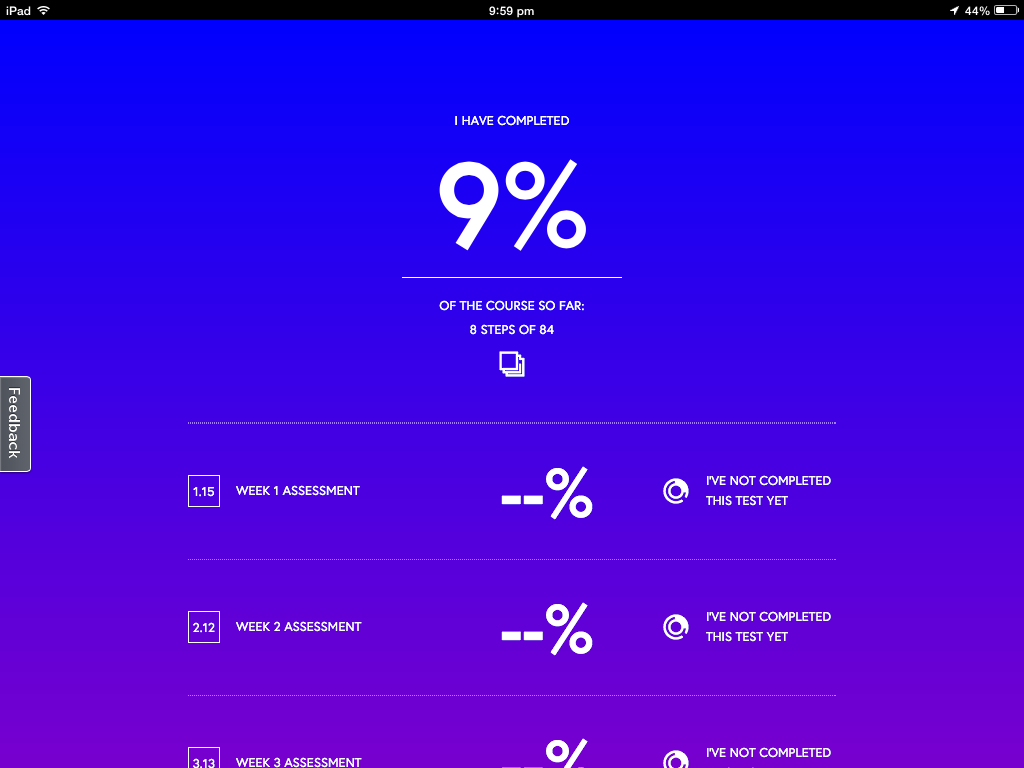
You can keep a check on your progress on this screen, where it tells you how much you have completed and any marks for tests that you have done. 
I have been going through all the steps on my iPad up to now, but you can do them on any device as you just have to log into the site on a browser. 


So what can I take away from this?
  • Progress on the course being visual and easy to keep up with.
  • Each week being broken down into small steps.
  • The videos are clear and easy to understand.
  • The videos are not too long each time so are easier to take in the whole thing.
  • The timing of the videos being stated before you click play so you know how much time to give them.
  • The transcripts of the videos being available to read afterwards. This is good with different accents, understanding etc might make videos alone not very accessible.
  • The chat / discussion / forum area of each section is a good idea but for younger students this needs to be more structured than just an open area. A particular focus for discussion needs to be put in place but I like the idea of the students on the course helping each other.
I have not got to the part where there are activities and tests yet.

Questions...

With the timetabling constraints within a secondary school, there are always students who would like to take my course but the timetable clashes with another subject.
Would I be able to set up an entirely online course for these students?
I feel that I would have to meet with them still to give face to face support on things they were unsure about, and it would have to be after school. How often would be enough to support an online course?
Would this give students the opportunity to gain more credits without it taking time and options off them during the school day? 
Would I be able to explain and support the skills needed in DVC enough for the students to produce work of a suitable standard?
How would students submit drawn work? 
Would the online students have to come in to the DVC room to use equipment? When would this happen?

I am fascinated by all these questions and I think my next step next week is to talk to particular students who I know did not take my course again this year due to timetable constraints, and see what they think.


Saturday, August 24, 2013

To e or not to e ?..... Blended or eBlended?

I am actually finding it easier to blend everything this year. My classroom has 6 desktop computers (pc's) which have Photoshop and Illustrator on them, as well as being able to go online, and the students bring their devices (either netbooks or chrome books). In DVC, we have always had to do research of existing products and analyse them. BC ( before computers ), this was a case of cutting pictures out of catalogues and magazines. Then it was booking a computer suite when one was available. Now it is when we need it, in front of the students, at their finger tips. What is this product made from? How is it constructed? Instant research available.
The students are finding it easier and quicker to write their design briefs and specifications and analysis online, on either a Google doc or Google drawing, as feedback from me can be actioned without whole rewrites on paper.
Using Google drawings to produce analysis diagrams is quick and easy, with no need to wait for printing of images that they want to use.
The drawings we do have always had to be done on paper, and I personally don't want to see that change. It is a skill that is vital for design work, getting ideas out of your head and down on paper. Rendering those drawings, to get the surface and the lighting right is also a skill that is needed to be on paper. Yes, I know you can get awesome effects using computer programmes, but if you understand the concepts by hand, then applying them with other methods becomes easier to understand. I also think that about model making. Online testing and modeling is all very well, but sometimes you just need to hold the design in your hand, in 3D, there in front of you.
Typing up analysis notes about design work online is easier for some students than writing it next to their designs as they don't feel under pressure to get it correct the first time. No one wants to stuff up notes next to a drawing they have spent some time on.  This is why I have been trialling scanning the drawings this year, so they can write their analysis notes online, next to the scanned version of their work. The same with the photographs of the their 3D models. Saying that, my class have been trying out an online design programme called Floor Planner this term, to help them with the layouts of their batch designs. It has proved an interesting experiment, and I am getting Level 2 and 3 students producing design layouts at home and coming in to school keen to show me what they have been doing! 
Being able to photograph all the testing and modeling during the design development process has been great this year. I always have my phone in my pocket which has a decent camera on it and then the students are responsible for getting their photos from Flickr after I have uploaded them up there, to put in their project sites. This is WAY easier than me printing them all and then the students spending way too long cutting them out and sticking them in their books.

So, if I was to sum up, I feel that this blended approach has made it easier for me and the students. Obviously, to start with, nothing is smooth and easy. We have had bumps. Now we are in the flow, it is going ok, with lots of improvement room and plans for trying new things and making it better.

I like the term blended, without the e, as this reasons that I am using the "e" as just another tool to do the work we need to do, not be the end result. The focus is on the work and the learning. We get to choose from a wider variety of tools now, that is all.

Thursday, August 8, 2013

We're all Really Blended...

We had another after school PD session today for an hour. This week's topic was blended learning.
I set up a simple scanner with one of the Asus netbooks, so staff could have a go at scanning work, book pages and worksheets straight into a netbook. I showed them how Google docs rips out the typed words from a worksheet, and lays it out for you. This works for a scan of something or a photograph of a page.
I made a "How To" on this topic here.
At the moment, Google docs is poor at doing this if there is columns in the page you are converting, as it mixes it all together, but we are hoping for improvements from Google here.
I showed the staff how easy it is to install "Simple Scan" onto the netbooks, so they can pass this onto students. It will be good when students can just take their netbooks to a scanner, connect it on and then easily scan the work that they have produced on paper, ready to upload onto their Google drive.
Next, I showed them how I use Flickr in DVC to upload the student work. I have links to this Flickr site on the DVC site so it is easy for the students to find it so they can then find the photographs of their own work, download them and use them on their own sites or documents.
Link to the DVC Flickr here.
I use Flickr for this rather than Picassa as I use my Picassa for images that I want to use on my DVC Google site and I don't want to fill it up with the student work photos. I take a lot of photos as the students are working, especially when they are producing 3D work.
Making the students responsible for finding and downloading their own work saves trying to remember who's work belongs to who and emailing it to them.
We discussed having some kind of camera available in the class when you know when the students are going to be doing something you will need evidence of. I personally have an iPhone, so I always have a semi decent camera in my pocket.

We all work in classrooms where we do a combination of work directly online and on paper  in books or 3D. It is good to have a variety of methods where you can get the work online so it can be all together, be able to be embedded onto student Google sites and documents, and appearing on the teacher dashboard to be checked and marked. This saves staff looking in lots of places to find work. It is all in one place.