Wednesday, February 21, 2018

Manaiakalani Class OnAir Lesson 1 - Subject Specific Vocabulary for Describing Design Analysis


Link to Manaiakalani Class OnAir to see the whole team.

Direct Instruction

I had the students together so that we could all input into the word bank on the document.
These need to be words that they have had exposure to in the project so far.
They will be using these words in the describe exercise that they are doing as part of their design analysis.

Link to support document
These are short videos of working with / chatting wth students one to one


Student work 1

Student work 2   Student work 3   Student work 4
Student work 5   Student work 6
Lesson Topic :- Design Development Analysis - Describing
Year Group :-  Year 11
Learning Outcome
To be able to describe the design developments of themselves and others in the class.

Success Criteria
Using SOLO


Uni
structural
Multi
structural
Relational
Extended abstract
Students can identify words in the list put together by the class and use 1 or 2 of the in their descriptions.
Students can describe their design developments and list the attributes that each one has.
Students can relate the word list we are going to put together to the design work they have been doing and use these words to describe their work.
Students can reflect on what we have covered since Jump Start and contribute into the group discussion about vocabulary.

Links with the New Zealand Curriculum

NCEA Level 1 - Curriculum Level 6

Outcome development and evaluation

Critically analyse their own and others’ outcomes to inform the development of ideas for feasible outcomes. Undertake ongoing experimentation and functional modelling, taking account of stakeholder feedback and trialling in the physical and social environments. Use the information gained to select, justify, and develop a final outcome. Evaluate this outcome’s fitness for purpose against the brief and justify the evaluation, using feedback from stakeholders.


  • Thinking - remembering the words / vocabulary that we have been using.
  • Using language, symbols, and texts - understand how they have laid out their designs and be able to describe what they have done.
  • Managing self - contributing helpfully to the class discussion. Writing well thought out descriptions on the class community.
  • Participating and contributing - joining in the class discussion about vocabulary.
  • Relating to others - writing meaningful and helpful feedback on the work of others.
Prior knowledge
The students have had experience of all the words we are going to cover today.
They have been working on their design developments using Adobe Illustrator and Adobe Photoshop.
They have used all the design / layout words in activities during Jump Start.
Lesson Sequence


Session Outline
The students will be putting together a collection of words / vocabulary as a class that they can then use in their design analysis.
We will be focussing on describing / listing on the multistructural level of SOLO.
Student Activity
Teacher Activity
  • Sit round the front desk and listen to the instructions for the lesson.
  • Have class discussion about the vocabulary that has been used - listen to others contributions too.
  • Lead the discussion about what words we have used over the project so far that are topic specific.
  • Remind students of what we have done to jog their memories of words they have come across and used.
  • One to one discussions with students as they are working to make sure they know what they are doing and to guide them along.
  • Complete 3 design developments using Adobe Illustrator and Adobe Photoshop.
  • Use the support / question sheet to help them to write a description of their design developments.
  • Put their design developments onto the class community for the rest of the class to see and learn from.
  • Write the design analysis notes / descriptions in the comment sections under the posts on the community.
Resources

Next Steps
Next Lesson
This activity was not completed today so next lesson we will need to continue with the same work.
Further in this project
We will move onto to relational analysis and discuss why they made certain decisions with their layouts, how these were affected by their architect’s design and what effect it has had on their poster design.
Reflection and Analysis

What went well.

Lesson Content :- There was one task to do but it was the student’s first time doing this so there was enough to do.

Lesson Pacing :- About half of the students got onto the analysis work.

Lesson Delivery :- I had quite a bit to talk to them about at the start of the session, so this section was just part of it. I was able to work with them on a one to one bass a lot which was helpful to them and me to see how they were understanding what to do.

Student Understanding :- They joined in the whole group discussion really well considering this was the first time we tried something like this.

Student Outcomes :- They have started to put together some good answers to the questions on the sheet.


What still needs work.

Lesson Content :- I should have supplied some sentence starters for some of the students as there was some confusion as to whether they had to write the questions out or not.

Lesson Pacing :- The students have not all started this activity yet as they are still working on their design developments. I need to make sure they are all giving feedback to others on the community whether they have completed 3 developments or not.

Lesson Delivery :- More support is needed as i was not able to get round and help everyone one to one. This support could be sentence starters or screen casts of what to do so they feel more comfortable with what to do.

Student Understanding :- I had to work with a few of them to get them to understand about answering the questions in full sentences.

Student Outcomes :- We need a lot more time on this. I don’t this that this is a bad thing though as this is their first time doing this.

Image result for google plus

On here is the design development work that the students have completed and they have started to analyse the work in the comment sections under the posts.

Tuesday, February 20, 2018

NCEA Level 1 Design Development Analysis


With my NCEA Level 1 Design and Visual Communication students we are learning to use Adobe Illustrator and Adobe Photoshop to develop our design work.
We are up to the stage with our design development where we need to write an analysis of what we have been doing.
There has been a lot of language and vocabulary that we have been using in both the design stages and the learning of the software that needs to be included in the analysis that they have to write.
I am going to share the following information / questions with them on a Google Document to support their analysis writing. We are going to do the top section together, so we can all add words into the key words box. These can be from the design elements work we did, the layout work or the programme specific vocab that we have been using.
The students will be sharing their design work into the class Google Plus Community, so I want them to write their notes in the comment sections under the posts. They have to do one of their own designs and one from someone else in the class. When I have asked students in previous years, they have always found it easier to analyse each others work rather than their own. By putting it on the community, they can all see each others' notes, so can get ideas from each other without feeling shy about it.
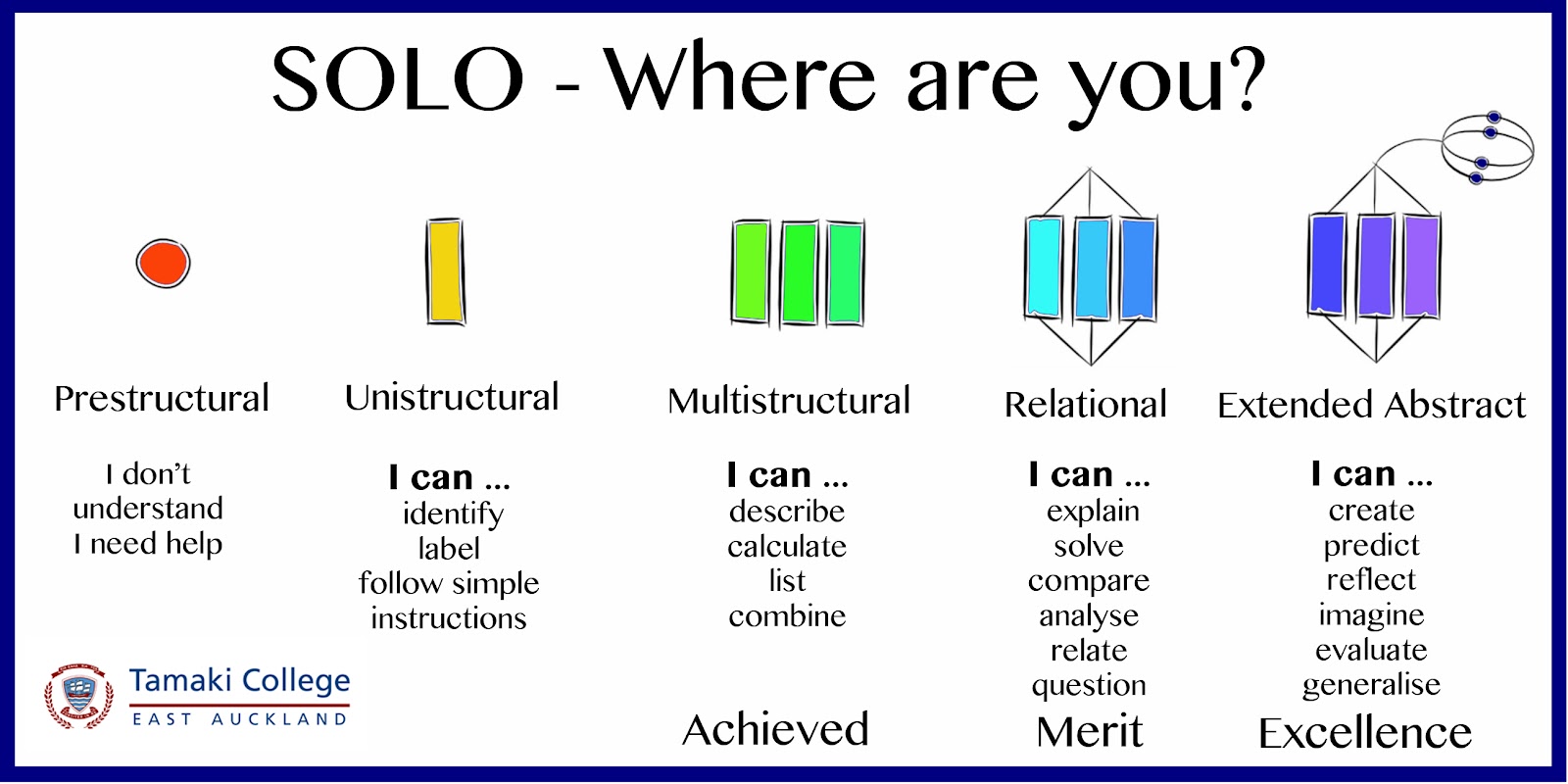
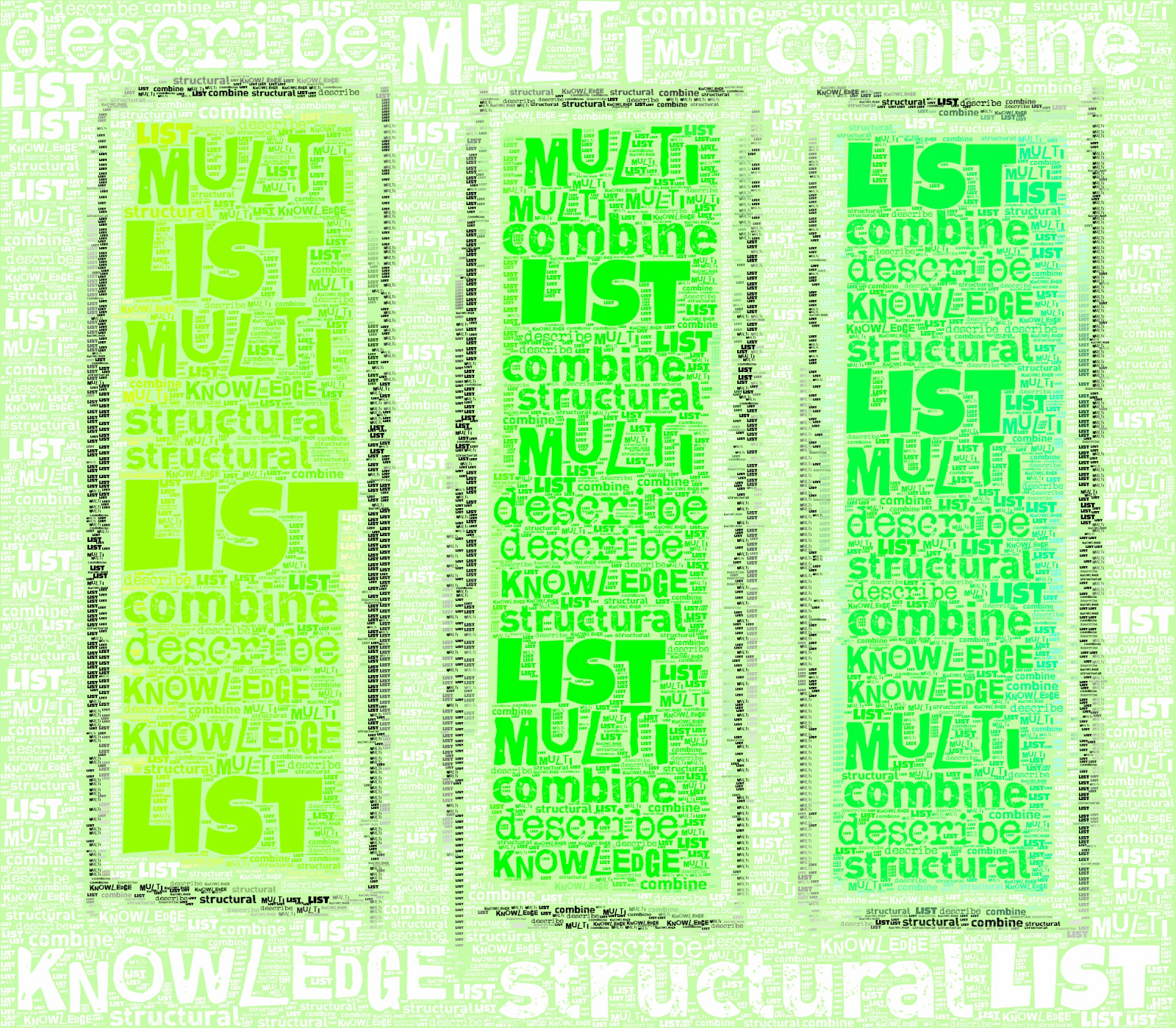
I have colour coded the work green to tie in with the SOLO Taxonomy posters in all the classrooms that show the multistructural sections in green.
Link to document


Design Development Analysis Step 1 - Describe


We will fill up this key words box together as a class before you answer the
questions about your design work and the design work of others in the class.


Key Words


Page
What shape and proportion is the page chosen to design the poster on?


Main Title
Where is the main title on the design?
How big is the main title when you compare it to the rest of the design?
What font style has been used?
What colour is it?


Pictures / Images
How many images have been used?
Describe how the images have been laid out on the page.


Information
How many columns of information are there?
What kind of font has been used?
What size font has been used?
Is it easy to read?
Describe where it has been put on the page and how it has been laid out.


Extra Analysis
Describe where the white space is on the design.
List the colours that have been used in the design.


Monday, February 19, 2018

Aiming high....taking the leap

In the words of the fantastic Bruce Lee, failure is not the crime. Failing to aim high is the crime.

In this vain, we are aiming for excellence in Design and Visual Communication and taking that leap of confidence in ourselves.


At the weekend, to celebrate my 50th birthday, I took my own giant leap of faith and did the jump off the Sky Tower in Auckland.

Here is the official video of the jump ....


Here is a video taken from the bottom.


Here are the official photos from the day ...


Thursday, February 15, 2018

Analysis of Existing Products with Year 9

My year Year 9 class are designing fruit juice cartons this year. We will be producing the networks of their designs using the laser cutter with slide on sleeves on the design to create different layers and shapes.
Class site here
Before we get to design work we need to look at existing carton designs to see what is on them.
The first part of this today was a good exercise in resilience and failing. We were trying to do a Google Image search for a picture of a juice carton that is taken apart and folded out flat. We tried "juice cartons 2d", "juice cartons networks", "juice carton flat" .... and many other attempts in between. The students were great. "Try this one Miss"... "no that doesn't work" .... We eventually got some hits with a suggestion from a student "net of juice carton".
They then had to put his on a Google Drawing ready for analysing.
This example here is the one I was working with on the projector screen as the students did theirs.

What the students had to do was identify and label the main elements of the design. We were shouting out ideas for everyone to find that on their example. All the students images were different designs so they had to focus on finding these elements.

I highlighted the SOLO Taxonomy poster on the classroom wall and told them we were working at the unistructural level doing this as we were
I highlighted my example that was being put together on the board they worked in yellow for these sections to match with the poster.

We then talked about which elements had to be included on food packaging by law.
These were highlighted in green to indicate that we had started to describe the different parts of the design by doing this and were therefore in the multistructural area of SOLO Taxonomy.


We had a double period today, but only did this exercise for the first one so it is still unfinished. We did a bit of practical work in the second half and started looking at making 3D shapes and made a cube.

Tuesday, February 13, 2018

Describe with Year 10

My Year 10 class have started their design project and need to do some product analysis of existing products. To help them with this I decided to do some literacy exercises with them today.

I put all of the resources they needed for this on the class site. I have made a space especially for literacy like I have with my Year 11 group. I plan to do this for all year groups to hopefully emphasise the importance of these literacy exercises that we will be doing.

The class had to get into groups of 2 or 3 so they could support each other through this activity and work together.
They had to make a copy of the Google Slide and share it with members of the team.

We were focussing in on the multistructural part of SOLO Taxonomy, so by indicating the poster in my room, we had a discussion about using the word "black" for a colour was just labelling / identifying the colour not describing it. So that was not in the correct SOLO area.


The students worked well on this and tried hard with everything. Here is a selection of the work that they produced today. Interesting discussions / arguments were breaking out with different opinions that were being solved by some searching  / research on the internet.


After that, I gave out paper and pencils and we reversed the activity. I was shouting out words that they had to quickly draw illustrations for. The focus was not on the quality of their drawing skills at this point as I wanted them to concentrate on the words. 
I used words like "furry, spikey, humongous, metallic, square, cuboid, sphere".
If they did not know what a word meant, they were not allowed to ask me, they had to research on the internet quickly. We also discussed words that could be seen in different ways like "flat". Some students saw the paper they were drawing on. Some saw the road outside the classroom. Some saw a singing voice could be flat. 
I then got them to fill in boxes on a Google Drawing to give me some feedback about what they thought about working in teams and what they thought about doing literacy in Graphics.

Describing the objects was difficult because i got confused with shape and form

I think it was easy to work with my group because you don’t have to do all the work

It was algds working in a group because we got to choose who we wanted to work with which made it easy to talk about our ideas.Plus we work more better with friends then with others.

I think that working in a group has helped many students because they get more help and not only that working on literacy work during graphics has helped us not only for this option but also for our main subjects such as english.

I think the other group was copying us and they think they slick because they think they gots aways. 

My group was alguds cause we make the discussion and talk about the shape.

It was good working in a group because you have other people in your group to contribute their ideas.

My thoughts about working in a group was a good choice because you have one another to help you out and this activity was easy to work on in my group because my team and I are scholars.

Monday, February 12, 2018

Team work at NCEA

After experimenting a little with some team work at Level 2 NCEA last year, I got some positive feedback from the students about it. There is some student voice about the first Level 2 standard from last year here.

As part of my inquiry this year, I want to do a lot of literacy strategies to enable the students to achieve at merit and excellence. Within this work, I want to build a lot more group work into the tasks that I set them.
This will give them ~

  • confidence
  • the ability to help and support each other
  • the chance to talk within their teams about the task
  • the chance assign roles within the group / team for themselves
When I tried this last year, I received feedback from the internal moderation process which was really good and helpful. That was to make sure that it is really obvious within the group work which part was completed by each student. This is to make sure that their submission for NCEA is clear and their own work.
I am aiming to do this in a couple of ways. When they are working on practical activities together, they will fill in the spreadsheet and indicate what they did on any given day working as the team. When they are working on shared documents online, they are going to colour code their own work in some way, either by using the highlighter feature or by the note feature.


So far it is going well.
When I asked them today what they thought about working in teams for NCEA ~

  • It is different to last year
  • It is different to the other NCEA classes
  • We like it
  • It's great
We had a great conversation today about who in the group was the watcher, the bossy one, the neat freak, the organiser, the quiet get on with it one, the loud front man ... they were all pointing at each other claiming it was others in the team.
So far so good.

Sunday, February 11, 2018

Google Site set up 2018

This is my Google Site for Design and Visual Communication for 2018.
I have used new Google Sites to make it and the video focuses on the layout of where things are and how Visible Teaching and Learning and rewindable learning has been addressed.

  • Overviews of whole courses
  • Calendars with weekly tasks
  • Deadlines
  • Standard breakdowns
  • Small tasks
  • Drawn examples
  • Screen casts

Saturday, February 10, 2018

Know your learner - Ethnic Breakdown

As a first step towards knowing my leaners this year, I have looked at the ethnic breakdown of my three groups of senior students.

NCEA Design and Visual Communication 2018

Ethnic Breakdown

There is a total of 19 Year 11 students doing Level 1 DVC.


There is a total of 14 Year 12 students doing Level 2 DVC.


There is a total of 14 Year 13 students doing Level 3 DVC.


Thursday, February 8, 2018

My Inquiry for 2018

This is one of the identified Achievement Challenges for the Manaiakalani Community of Learning.

Raise Māori student achievement through the development of cultural visibility and responsive practices across the pathway as measured against National Standards and agreed targets for reading Years 1-10 and NCEA years 11-13.

I will mainly target my senior classes who are working towards NCEA. One class is Year 11 students working on Level 1 DVC and the other class is a mixture of Year 12 and 13 students working on Level 2 and Level 3 DVC.


My Inquiry this year as a CoL teacher is.....

What and who...


Support my senior classes to understand and use subject specific literacy and vocabulary to enable them to access higher levels of NCEA achievement.
I will also work with my junior classes so that they have more knowledge when they reach Level 1.

The how...

We will work through project based tasks that are specifically targeted towards literacy and vocabulary.

This will be through the use of online tools for teaching and learning and through a pedagogy based around SOLO taxonomy.

It will also be through the implementation of elements of Kia Eke Panuku, especially Kotahitanga and Ako, where the students can work on certain tasks together to build confidence.


The measurable outcome ...

This is targeted towards achieving the school focus of  16+ credits at Level 1 and 14+ credits at Level 2 and 3 for each subject that the students take.
This work is also to enable more access to merit and excellence levels on the NCEA DVC standards.

First CoL Meeting of the year.

We met as a CoL for the first time this year and we were lucky enough to have two presentations that will start off our inquiry year in the right direction.

Meta Analysis of Inquiries

Woolf Fisher

“WFRC will analyse data and evidence from teachers’ inquiries to identified Learn Create Share
practices likely to contribute to accelerated progress for students.”

Not everyone can access what is in your head so inquiries are key. It is vital that the inquiries are picked apart and shared so everyone can benefit from them. This year, the CoL inquiries will be analysed to see what works at a deeper level by our research partners, Woolf Fisher.


Language Acquisition & Development as the Inquiry Lens into your subject/level

Dr Jannie van Hees

Language in abundance has no set way of working, it is not a one size fits all, it is a process of finding out. Language needs to be around the students at all times.
Conditions for learning -
How do you get knowledge? - the main way is through words (in various ways) -this grows cognition and knowledge.
We watched a series of videos that were all trying to teach us how to do the same task. They varied in what type f information was given.
No words, just video how to - we were calling on prior knowledge and knowledge of the names of the things used. It would be really hard if there was no prior knowledge of these things,
No transferability as there is no language used.
Spoken instructions over the visuals and written on the screen.
Words give a sense of context - it is obvious what is being made.
Can slow down and replay, so it is rewindable.
What does language offer a person?
Do we look specifically at language that is offered in the resources that are given to the students.

  • What does language in abundance mean for a particular teacher / class? 
  • Quantity of talk needs to happen. 
  • Responding and elaborating. 
  • Setting up a culture of valuing contributions. 
  • Actions with talk that goes along with it. 
  • Vocab needs to go alongside meaning and putting into context. 
  • Participate and interact with the words. 
  • Explain is an important skill to be able to do

Anywhere, any time, any text.
Do we read enough to students? Do they read to each other?
Don’t hope that they come across words - make it on purpose. How can they notice the words and know what they mean and how to use them.
Language in abundance by itself is not enough - it needs support.


What’s the Big Idea for 2018
“Language in Abundance”, Language Acquisition, development, Transfer
and sustaining across school levels and curriculum domains.

Language in abundance environments ‘drip’ with language availability and attention, where noticing and relevant use of words allow for deeper, wider, more specific and precise, context appropriate language expression…leading to knowing at deeper and broader
levels. Dr. Jannie Van Hees

What’s OUR responsibility as CoL teachers?

  • Conduct a mean as inquiry at your level/s in your subject/ 
  • Language in Abundance is the lens 
  • Share it really well 
  • Help each other 
  • Visit online/offline, debate, discuss, challenge, suggest