Sunday, August 8, 2021

Self Tracking for Intermediate Tech Coding Planning

 My inquiry this year is looking at how I can get students to be self motivating in their project work. Part of that problem is knowing where they are within a project and knowing where they are within the assessment process.

For a while now, I have been making standard breakdown documents for my students. 

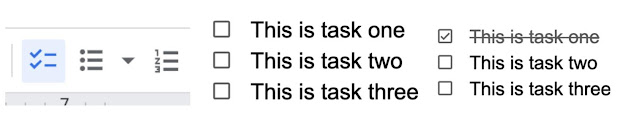
I am not sure if my students use these to be honest but they have been really useful for me to ensure that I am covering work that will give them access to all levels of achievement. I have recently discovered that you can do a checklist option on a doc which you can tick and it crosses out in a very satisfying "i have done that" kind of way. I think I will redo these sheets to include these to see if I can get my students to use them to track themselves. We already use a class shared spreadsheet for tracking. 
Recently, we had a department moderation session where we were looking at the planning and marking of junior and intermediate projects.  Mrs Anderson shared the sheet that she uses to track the evidence for computational thinking. (I wont share hers here as it has student work on it with names etc). 
A copy of this was made and feedback from the moderation process was put under the grid of descriptors as the moderation went along. This was very useful, having lots of eyes of fellow tech teachers on my planning and seeing where the gaps are. I then used this to highlight in yellow where I needed to add things.
I then cleaned this up to be a version that is useful to me to make sure that I cover everything that is needed on my site for that mBot project.

I put this onto my class site in the assessment area for this mBot coding project but realised that it is not particularly useful for the students as it uses the language straight from the progress outcomes.
It was when I was converting this document to the more student friendly version that I found the checklist option on docs. I will use this version with my two coding classes in the next tech rotation to see if it is any good and do any changes needed to make it better.


My hope is that we can all make a copy of this doc at the start of the rotation, share it with the teacher and use it to link up the evidence documents as they work through them from the class site. This will give them a very visual indication of where they are both in the project and the assessment.


Friday, July 30, 2021

Changing what doesn't work


My year 12 group have been looking at specific design eras and one of the things they have to do is talk about how things that were happening in the world at the time affected the design of the time. This has always been a particularly difficult part of the work for this standard. 

I had been using the cause and effect templates on this page on my class site. I had given them links to news articles from different time eras (down the bottom of that site page), and I have given targeted help, with readings from 2 particular design eras as they were the most popular this year. I knew that this had been giving issues in previous years but decided to stick with it this year.  Below here are examples from 3 of the students in that class. You can see that they used the template to collect information but did not make the connections that they needed to make to the design that was happening at the time. 

It was time to accept that it wasn't working, suck it up an do something different. 

I am a big fan of using SOLO Taxonomy structured templates so I decided to have a go with using a SOLO hexagons activity so the students can collect together seperate items of information and then group them together and form connections.

Here are some student examples and as you can see, they are starting to make much better connections between all the information they are collecting with their readings. (they had the same links to readings from the previous version of the exercise, but they were using the information in a different way)

So what have I learned from this? To trust my gut when I am sure something is not working. Throw it out and move on with something else. 

Thursday, July 15, 2021

Wednesday, July 7, 2021

My Class Site - 2021

 As my inquiry is all about my class site and how I can make it a more supportive environment, I thought I would do a screencast of what it is looking like at the moment.

Link to site


Friday, June 25, 2021

Coding on the Microbits - Rock Paper Scissors Flowcharts.

 My Year 8 class today were coding with the Microbits. To continue our work on using flowcharts to plan our coding, we wrote the algorithm for playing Rock Paper Scissors and then designed a flowchart to show how the coding flows through. I know this is a bit back to front at the moment but I want them to get used to seeing the flowcharts and how they compare to the blocks on the coding.

Link to work on the class site.

Here are a few of the students blog posts about what we did today

Juel

Fau

Lilly


Thursday, June 24, 2021

Using flowcharts to prep for coding - Part 2

 Last week, my intermediate class were looking at using flowcharts to plan coding. They planned the small sections of how the mBot has to behave to follow the black line. Blog post here

Today, we put together all the parts from the previous couple of weeks. The binary was used to code the mBots and the flowchart and code was all put together to get the final outcome.

The students then had a great time racing the mBots round the course, changing the speed variables and adding lights at every direction change.

Link to Google Drawing here


Thursday, June 17, 2021

Using flowcharts to prep for coding

 My intermediate class are coding mBot robots. To get them into it, we have been just kind of launching ourselves in and doing "stuff".

To prepare for the "Follow the line" task (link to task on the class site here) we have been preparing so they know why the code is like it is and why the mBot is behaving as it is. Last week we looked at binary. We did an introduction to what binary is and some whole class activities and then we played some games so they got the hang of it themselves. (link to work here) 

This week we looked at flowcharts and how they help you to plan a sequence of events that have to happen. Link to work on class site here. We went through the symbols and where to find them on Google Drawings then went through the "Do you take sugar" example. The class then had a go with the "Socks" activity themselves and we looked at using loops with the alarm clock example. 

We then started to apply it to the following the black line main activity that they have to do. We went through the sequence that had to happen verbally first so they understood which way the mBot had to go in the four different circumstances. 

  • both sensors on the black line, 
  • the left sensor on the black the the right sensor on the white, t
  • the right sensor on the black the the left sensor on the white, 
  • both sensors on the white. 

We did the first two events together, then they had to do they second two themselves. It came together quite well as we were combining the binary work we had done, the flow charts and seeing where it all linked to the coding blocks. Seeing where the flowchart links directly to the coding blocks is good.

Here is my worked example, which I did on a google drawing. Maybe I should have done it on a presentation so each event could have its own page and be clearer to understand. Link to drawing here.

Next week, I want them to combine it all together and upload it to the nMot to see if it works. They will then understand why the numbers on the inputs have to be 0,1,2 or 3 and understand the flow of the algorithm.

Tuesday, June 8, 2021

Inquiry Question 6 - Academic or Professional Reading Part 1

 The first reading that I am doing this year is "Why Don't Students Like School" by Daniel Willingham.


"Thinking is the hardest work there is, which is the probable reason why so few people engage in it."
"... when we can get away with it, we don't think. Instead we rely on memory"
He talks about how if you had to really think for the whole time instead of using memory for most of it, how that would be really tiring. He relates it to being on holiday where you don't know the language and everything is new. Travelling is really tiring, as all the trivial actions that would be on auto pilot at home have be be thought about the whole time.
"if you repeat the same thought demanding task again and again, it will eventually become automatic; your brain will change so that you can complete the task without thinking about it."
This reminds me of my Karate sensei talking about muscle memory. Repeat, repeat, repeat of the same movements for Kata eventually moved it into memory and then you could start thinking about how to use the movements instead of concentrating on how to do them.
"Despite the fact that we're not that good at it, we actually like to think. We are naturally curious, and we look for opportunities to engage in certain types of thought. But because thinking is so hard, the conditions have to be right for this curiosity to thrive, or we quit thinking rather readily"
"When I say problem solving in this book, I mean any cognitive work that succeeds".
"There is a sense of satisfaction, of fulfilment, in successful thinking".
"When you solve a problem, your brain may reward itself with with a small dose of dopamine, a naturally occurring chemical that is important to the brain's pleasure system".
"working on problems that are of the right level of difficulty is rewarding, but working on problems that are too easy or too difficult is unpleasant".

I have been having conversations with fellow teachers at TC about how the students react to tasks that let them have an obvious, visible improvement over a short period of time. We did a drawing practice activity recently and the students reacted really well to it and wanted to continue. It was set up so they could practice the same skills over and over but the drawn outcome was changing slightly each time. Link to activity on the class site - it was printed out for them to complete with marker pend and coloured pencils.
When I read about the brain giving out pleasure chemicals when you learn something for yourself this made a lot of sense. I could see the students enjoy seeing themselves improve over the time of the activity and will get it back out again to revisit when they are supposed be on something else.
How can I set up more activities like this so they can feel good about the progress they are making and in how they are improving and do it less for "getting credits"?


Saturday, June 5, 2021

Inquiry Question 5 - Hypothesise and Research


  1. Share your findings about the nature and extent of the student challenge. Make sure it is clear what evidence from your inquiry supports each finding.
  2. Explain how some of the data you have used to build a profile of the students’ learning will be used as baseline data at the end of the year.


I have spent some time looking at the statistics that are supplied by our senior management every month.  I wanted to analyse where the credits were being entered over the year to see if there was a pattern at all. If students see themselves getting something concrete out of all the effort every day, like credits, then this will give them that feel good push to keep going. 

To start with I looked at the overall credits from last year to see when they were entered into the management system. Blog post here. What is disappointing when I look at these graphs is how long it takes to get the first credits entered, ie get the first set of work completed. This must be hard for the students to keep working on the same stuff each day without seeing any pay off for such a long time.

Because of this, I next wanted to analyse when the first credits were entered over the last few years. 

This turned out to be quite late in a lot of cases, not many students when it was earlier and in a couple of cases, terrible. It I am working on mindset, then how is this affecting the students?

As my first thoughts about my inquiry were about supporting the students to feel more confident with their project work, I have asked them what they like when they are getting work sent to them from teachers. Blog post here. 

Things of notes from the results
  • Students like quite a varied way of receiving their work
  • They like a website / workspace to be well ordered and visually appealing
  • They like a mix of verbal and written instructions, with examples to look at and refer to
  • They appreciate having instructions and examples rewindable so they can look back at them
I have been experimenting with making a more supportive environment on my class  site to see if they noticed and to see if it made any difference. Blog post here. It is good to see that this small change is already making a difference and they did notice when they were there and when they weren't. 

A big part of getting higher grades at NCEA Design and Visual Communication is the quality of the analysis notes. It is no good me building lots of support into my planning for the drawn elements and not putting the same amount of effort into the literacy elements.
I have done an initial exercise with my Year 11 group. Blog post here. We then did the reading on the class site page  - Exercise 2 - and wrote a sentence based on what we had read. 
"I think that _________ would be a good choice for this chair because _______________"
I will use this as my baseline for the class as we are now going to be doing a lot more work on structuring this to be more supportive. I am going to enlist the help of Marc Milford, our literacy specialist again.


Wednesday, June 2, 2021

Cluster Create Workshop - Rock Paper Scissors with Microbits


For our cluster create staff meeting this term, we all got together at Stonefields School and it was the students this time who were doing the presenting and working with the teachers to show them new things.

My team was some of my lovely Year 8 class from Glenbrae School. We have been doing coding for their Tech rotation so they taught their class of teachers how to code the Microbit to play Rock, Paper, Scissors.

Here is the presentation that they worked through and spoke to.


They presented really well and helped their "class" really well too. Here are a few shots showing them at work.

Monday, May 31, 2021

Literacy Exercise and Practice with Year 11

 The department has been working with Marc Milford, out literacy expert, for a while now and we have all been making literacy posters for our classrooms so we are presenting a similar approach across the department.

Hinerau wrote a blog post about  the department process here

My original blog post when I worked with Marc on the poster for DVC

Here is my version of the Explanation Poster fro DVC - this went through moderation with Marc so all the posters in the department were showing the same things and skills.


I had printed off copies of the NZQA exemplars and the students had looked at them and seen the difference between N, A, M and E. It is not only the quality of the drawings but the depth of the written analysis as well.
This is also where I got the example to put on my Explanation Poster.


After reminding them today of what we had looked at on these exemplars I gave them out a small copy of the poster on the wall and we read through it and picked out the noun groups and why they were noun groups.
They then had to read through the blank example that I had put together for them and colour in the noun groups that they could find.


We did this as a group and called out the ones we found so we could all share and colour in together.
We then looked for modals / opinions and coloured them a different colour.
Then we looked for the verbs.
The class had a really good try at this today and worked well together.

The next activity is to read information given about materials and write a paragraph about a given picture of a chair.
We did not get really into this today but we sat around together and did a description of the chair before we did any of the reading.
We will then compare the next description they do when they have done their reading about materials and when they use the skills we practiced today.


Saturday, May 29, 2021

Student Feedback on Support Videos


My inquiry is based around making the class site a much more supportive and multi modal environment for the students to use.  Blog post 1 here  Blog post 2 here  outlining how I see the inquiry problem.

Part of that recently was to make examples and support videos of the design brief process for my Year 12 students. I purposefully only did part of the process to see if there was any use for this support.

Link here to where this is on the class site - as of writing this blog post, I included support up to page 4 of the design brief document.

I have recently received feedback form two students from that class who are further ahead than the rest of the class.  

Student A was the first to get ahead of where I had included support. He comes to talk to me one to one a lot and we discuss together what he is working on at the time. I asked him if the support on the site had been helpful. He had used it but he still comes to me to talk one to one. Then I asked him if the support on the site was any good as he was talking to me a lot more than the rest of the class. Did I need to improve or change it to make it more useful. He does use the site but he really likes to talk one to one so he can go over his work in detail and get ongoing feedback so he knows he os on the right track.

Student B came to me this week as she had got as far as the support on the site had and was asking me where the next ones were. I asked here if she had been using the videos on the site up to now and she said she has been using all of them. She said they were really helpful. This student is very hard working and always likes to keep up to date with her work and she said the videos helped her with this. She is very self motivated and will work at home and email me regularly to check her work. 

When I look on YouTube, where I have uploaded the videos, there is definite evidence of the videos that I have made for the Year 12's so far this year being watched.


Wednesday, May 26, 2021

Tracking Achievement - Year 12 - When the first credits are entered.

 To help me to see if my intervention is having any measurable effect this year, I have been looking at the stats from previous years. I have already looked at when the credits were entered last year - Blog post here.

What I next wanted to check on was when the first credits for the students were entered into Kamar for NCEA Level 2 DVC.  This will indicate at what point in the year that the work was being completed.

I looked at the monthly spreadsheets that are generated by Mrs Moore over the last 4 years to see when the first credits appeared for the Year 12 students in DVC.


The students are doing really well considering that out of the 26 students, only 9 of them did NCEA Level 1 DVC last year.  Of those 9, 6 of them have got their first credits in already.