Showing posts with label PTC5. Show all posts

Friday, September 8, 2017

Presenting at the Manaiakalani Boards Forum

Last night, I was asked to be one of 6 teachers to present at the Manaiakalani Boards Forum. These 6 teachers represented the 6 achievement challenges for the Community of Learning.
What was really interesting while listening to the other presentations by my colleagues, was the fact that similar challenges to student learning were becoming apparent in inquiries across the cluster. One of these that stood out the most was literacy and vocabulary in all areas. This is definitely something that the future of my inquiry will be focussing on.

We had to put together presentation display boards for the board members to look at. These boards outlined our inquiry to date.


We then took turns to stand and explain our inquiries to the board forum.


This is the slide deck that I presented about for my inquiry.


Tuesday, August 29, 2017

Priority Students - Is there any shift?

As part of our PLG groups this afternoon, we looked at the priority students that we had chosen at the start of the year and later on in Term 3. We wanted to look at two things. One was to see if there has been any shift over the year and the second was to see how they are doing in all of their other lessons compared to your own.


We then had to make a plan about what we were going to do next and which teachers we were going to contact in regards to those students.

First Group (Term 2)


First GroupReason
Student 1Credits in Maths and BCaTs and none in DVC
Student 2Credits in Science and Maths but none in DVC
Student 3DVC is the only lesson she has no credits in


1st May Total
8Mat-4Sci-0Eng-0Vis-0BCAT-4
8Mat-4Sci-4Eng-0Vis-0Geo-0
14Mat-4Sci-4Eng-3Vis-0PE-3

20th Aug Total29th Aug
22Mat-11Sci-0Eng-0Vis-0BCAT-11Vis-4
39Mat-11Sci-8Eng-3Vis-7Geo-10Vis-10
38Mat-11Sci-8Eng-3Vis-10PE-6

Actions by teacher
Whole classVocabulary exercises all together for product analysis.
Student 1I spoke with his BCATs teacher as he was acheiving and working really well in that class. I visited him in that class too to see how he was working. He was really quiet and focussed. I have been letting him use my laptop as it has the latest version of Photoshop on it so he can finish his project work. I have sat with another group but have activiely monitoring him and "kicking the back of his chair" when he has drifted off task.
Student 2Lots of one to one help and supplying examples of what she has to do. Not letting her settle for "just getting it finished", but making her focus higher. Working with her to show her how to do skills, sitting with her and doing the skill at the same time as her. She has achieved 10 credits at merit as of 29th August.
Student 3Working with her one to one with skills and tasks. Sharing excellence examples of NZQA examples and examples from Tamaki College so she can see that excellence is possible in the subject at TC. Letting her work on a different sequence to the rest of the Level 1 group as she is ahead of them.

Second Group (Term 3)


First GroupReason
Student 1No credits in DVC
Student 2No credits in DVC
Student 3Slow working. Seems to lack motivation
Student 4Slow working. Attendance issues and no work done at home.
Student 5Slow working. Lacks motivation. Won't come in the room.

1st May Total
8Mat-4Sci-0Eng-0Vis-0BCAT-4
4Mat-4Sci-0Eng-0Vis-0Mus-0
8Eng-0Mat-0Aut-0Vis-4Art-0
10Eng-0Mat-2BCAT-4Mus-0Vis-4
3Phy-0Eng-0Mat-3Mus-0Vis-0

20th Aug Total29th Aug
22Mat-11Sci-0Eng-0Vis-0BCAT-11Vis-4
8Mat-8Sci-0Eng-0Vis-0Mus-0
18Eng-0Mat-7Aut-5Vis-7Art-0
43Eng-4Mat-6BCAT-22Mus-4Vis-7
23Phy-7Eng-0Mat-6Mus-10Vis-0

Actions by teacher
Student 1I spoke with his BCATs teacher as he was acheiving and working really well in that class. I visited him in that class too to see how he was working. He was really quiet and focussed. I have been letting him use my laptop as it has the latest version of Photoshop on it so he can finish his project work. I have sat with another group but have activiely monitoring him and "kicking the back of his chair" when he has drifted off task.
Student 2Have sat with her and shown her how to do things but she will just sit and do nothing. Her attendance is very poor at the moment so nothing is being done at all.
Student 3Supplies examples of what to do. Sits with him and goes through with him what to do for individual designs (doing at the same time)
Student 4Make sure I catch up with him when he is in the lesson so he knows where he is and what he should be doing. He has an attendance problem due to working so I dont see him very often.
Student 5Individual task sheet for her to refer to
She does not come into the classroom but sits outside.


Plan for moving forward


Continue to give as much one to one help as I can. Make sure the tasks on the class site are the first thing the students look at when they come in.

The following list is which teachers to talk to about the students as they are doing well in their lessons. The conversation needs to revolve around how they are working with those students and if there are any strategies that they are using that work and could be shared.

Student 1 - Talk BCATs and Maths teachers
Student 2 - Talk to maths teacher
Student 3 - Talk to BCATs teacher
Student 4 - Talk to Maths and Auto
Student 5 - Talk to Physics and Music

Friday, August 25, 2017

Manaiakalani Hui 2017 - CoL Presentation

Today was the annual Manaiakalani Hui.
Part of this was the was inquiry presentations from the CoL teachers. We has set up together under our Achievement Challenge banners and the visitors to the hui had to come round with their Bingo cards to ask about one of the Manaiakalani labels from the inquiry structure. After getting information about one of the labels, they got a stamp on their card.
I was with my colleagues under the banner for Achievement Challenge 1 - Raise Māori student achievement through the development of cultural visibility and responsive practices across the pathway as measured against National Standards and agreed targets for reading Years 1-10 and NCEA years 11-13.


Here is the presentation that I had running that gives a general overview of what I have been doing, but most of my time was spent with people looking at my blog, in particular at posts related to the label they were wanting information about.
Most of the chat today was about my recent blog posts about how my inquiry has changed to include literacy and vocabulary. There was also a lot of interest shown in how I am using SOLO, the resources I have made and especially the visual self assessment structures that I have put together with the SOLO activities.
Thanks to +Fiona Grant for the above photo


Monday, July 31, 2017

Building up the design analysis in stages.

My seniors (Year 11, 12 and 13) Design and Visual Communication students are at the point where they need to do written analysis of their own design work.
This is always the difficult part for us so I have made it the focus for my Manaiakalani Class OnAir work this term.
So far, we have done exercises together on the class Google Plus Communities of common products that they are familiar with - Link to lesson post here.
Our next step was to take photographs of the design development work that the class has been working on and put that up into the community and analyse each other's work. There is no lesson link to this at the time of writing as I am still putting it together for Class OnAir. I have been working with students using the Google Plus Communities since doing my year with the Manaiakalani Innovative Teacher programme in 2014, where I focussed on blended learning. The students told me then that it was easier to analyse someone else's' work than their own.
This week, we are working on step three of this process where I am going to put up a product at the start of each lesson and we are going to verbally analyse it all together.
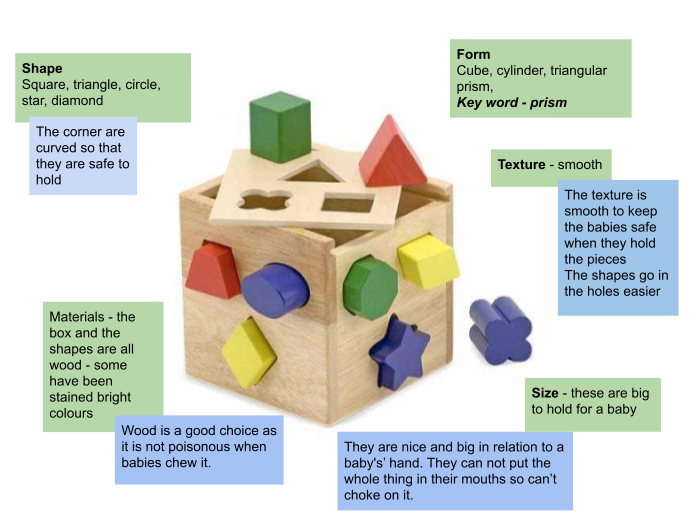
We had out first go at this today. I put up a simple product, a shape sorter, and we all sat round the front talking about the design decisions that has been made for that product. I wanted them to talk about it together so that the pressure of writing sentences about it was taken off them and they could concentrate on the analysis.
After the session, which was very short, 10 minutes maximum, they got back to their individual design development work. I wrote up what they said onto a shared Google Drawing and put it into the class communities for them to look back on if they needed to. My plan is to do this at the start of each lesson for the next couple of weeks so they get used analysing and hopefully increasing the depth of the analysis each time we do it.
I coloured their replies on the drawing in relation to the SOLO taxonomy posters we have in every class room at school.
I then spent the session talking to the students on an individual basis, helping them with their analysis work on their design by asking them questions that they had to answer themselves.

Here are their replies today :-


Here is the SOLO Poster information that it corresponds to :-


Sunday, July 30, 2017

It's nice to have visitors ...

This week, one of my colleagues, +Georgia Dougherty asked of she could come and observe one of my lessons.  The only time we could match up was Thursday morning when I had one of my Intermediate classes for a double period.
It was really good seeing the reaction of the students as Georgia was going round talking to them. They had not met her before but they were really nice and open and sharing. I think this says a lot about our cluster of schools and the fact that there is a regular stream of visitors and the students are used to talking about what they are doing and the how and why of what they are doing.

What goes on in your own classroom becomes the "normal" for you and I am always impressed when I go into the rooms of others about how focussed and on to it the classes are. This seems to contrast a lot with my room sometimes, which seems like noisy chaos! This always seems to be more apparent when someone comes to visit or observe me. I was hyper aware during Georgia's visit about the noise, the mess, the movement round the room, the focus. We were doing a few different things, finishing work, checking it off on a class sheet, doing design work and cutting out design work on the laser cutter. There seemed to be kids and mess everywhere. This does not bother me at all normally but I found myself apologising for it when I had a visitor. I need to get over feeling like this as it is what goes on in any normal classroom, depending n what they are doing and we mange to "get stuff done" in amongst all the mess.

I think it is part of that fear we have as teachers that people are judging us harshly about what we are doing in our classes. NCEA pressure does not help this fear or the fear of trying new things.
This became an interesting topic on a PD day yesterday - EducampAKL. I was working in a group on the first session and the talk got round to why teachers don't share very much. One person in the group brought up that it was about the school board owning any work that teachers produce, so unless you have their say so, then you can't share it. This was a very fair point but I honestly think that fear is a big part of it too. I have worked for a few years now as a support person in school, helping teachers with their online work and I see this for myself.

As teachers, we need to get over all of this and share everything we do. Why sit for hours producing resources that someone already has? Why do we feel nervous when someone sees the reality of our classrooms? What goes on in a teacher's room and how they do it can really help someone else.
So I need to stop worrying so much when people come in.  We are working hard and mess cleans up.

Here is Georgia's blog post about her visit.


Thursday, July 27, 2017

July CoL Meeting - The Good the Bad and The Ugly....

Today, in our CoL meeting, we had to analyse at what we were doing and share in our inquiry groups. Our groups for this meeting were based around the Achievement Challenges so we could compare what was gong well and what wasn't with colleagues working on the same goal.

Out main feedback session to each other was to highlight parts of our inquiries that was a success and which parts failed and where they can be improved.

This was my main feedback about this :-

The working together as small groups worked really well and they had a lot more confidence with their research. 

What is not going well is that now they think they can help each other with their drawings. This would be ok but it has branched into them doing it for each other rather than helping!!
I am trying to model how to help each other like this by doing drawing work with individuals and letting them do it the same way but not letting them have mine.

I was surprised when we worked together on a design analysis exercise that the hard bit was the describing. After talking to other teachers, I realised that this was due to lack of vocabulary. This has led me to put together the beginnings of a vocabulary collection especially for describing design work - link here

We all worked on a Google Drawing to plan our feedback first, so we could structure it correctly.

The outcome of this for me is that I have organised to go and visit +Kyla Hansell  ( her blog is here ) to talk about the students working in groups and how she does it.


Tuesday, July 4, 2017

School wide Unit Plan

Yesterday, during teacher only day, we were given an introduction to the new school wide unit plan.
Part of this introduction was why we were doing it :-

Aim of the Unit Plan


To create a unit plan that is consistent across all departments at Tamaki College


Purpose of the Unit Plan

  • Clarity of information
  • Quality teaching and learning
  • Teaching and learning information is visible and explicit
  • Links all of the Tamaki College initiatives into teaching and learning programs


We focussed on the first part of the plan today with the target being the unit that will be taught in term 4 as part of the Jump Start course for the Year 10 students who are starting NCEA Level 1.
Here is the blank template for the unit plan

The unit I concentrated on completing is AS91069 - Promote an organised body of design work to an audience using visual communication techniques.
This is the first thing we do at NCEA Level 1 and I have planned 8 weeks for this project (it is worth 4 credits so needs approx 40 hours of time, so I have allotted 48 lessons - 50 mins x 48 lessons = 40 hours). We get 4 weeks doing the Jump Start course so this is half the time planned for this standard. This means we get to finish it off when we start back in the new year and 4 credits will go in for the students really early on in Term 1.

Here is the plan that I put together for this standard. The time during Jump Start should take us to the thumbnail sketching, ready to learn some Illustrator and Photoshop skills when they come back in the new year so they can do their design developments.

Section One

Unit Plan Overview

Introduction:
The students will be designing a presentation poster to promote the work of an architect.
Topic/Context/Genre:
Designing a poster
Achievement Objectives:
Level 6 - Outcome Development and Evaluation
Critically analyse their own and other’s outcomes to inform the development of ideas for feasible outcomes.
Undertake ongoing experimentation and functional modelling. Use the information gained to select, justify and develop a final outcome.
Key Competencies:
Thinking - using appropriate research skills and showing understanding of design elements
Using language, symbols and texts - showing understanding of layout techniques to give a visual effect
Managing self - keeping up to date and finishing work on time. Using research to back up and support own work.
Relating to others - giving feedback to others about their design work that is helpful, supportive and meaningful
Participating and contributing - sharing work in the community for others to see and learn from
Level: 1
Class: DVC Level 1 (Year 11)
Timeframe: 8 weeks  (4 weeks of jumpstart)
Standard Number: AS91069
Internal or External: Internal
Credit Value:       4                  ( Lit:  4  )
Standard Title:
Promote an organised body of design work to an audience using visual communication techniques.
Internal/External moderation:

Teaching and Learning - Link to site

Activity Sequence
Learning Intention
(Students will be able to)
Learning Activity
Success Criteria
(Students can/will:)
Resources
Activity Timeframe
1
To be able to choose what style of architect they like the best from a selection.
Students will have looked at the selection of architects and have made a decision which one they will focus on. They will make a post on the Google Plus Community about which architect they have chosen to research.
Chromebooks
Week 1
2
To be able to understand how to use a Google Plus community in a respectful way.
All students will have access to Google Plus and have joined the class community.
Chromebooks
Week 1
3
To be able to use research skills to collect relevant resources online.
Have folder in their drive that is full of images of work by their chosen architect. This folder must be shared publically.
Chromebooks
Week 1
4
To be able to use research skills to collect relevant information online and be able to cite where they got that information from.
The information collection sheet will be full of information about the architect, their life, and some of the more famous buildings that they designed. The links from the websites that were used in this information search are to be included on the sheet.
Chromebooks
Week 1 / Week 2
5
To be able to scan read collected texts and pull out the important pieces of information.
Using the highlighting function on Google Docs, what students decide is the most important information will be highlighted on the information collection sheet.
Chromebooks
Week 2
6
To be able to understand the key design points in the architect's work and what effect they have.
A completed Google Drawing using the template provided, that shows the key design elements of the architects’ work.
Chromebooks
Week 2
7
To be able to show their understanding of their architect in their own words.
A Google Doc with the information typed up that will be used on the final poster design. This will be in the student's’ own words and  will be based on all of their research to date.
Chromebooks
Week 2
8
To understand how design elements have been used on existing poster designs to create a desired effect.
The students will post an example of a film poster in the Google Plus Community and write a brief analysis based on the structure / guidelines given.
Chromebooks
Week 3
9
To be able to use their knowledge of design elements in creating their own layout experiments
The students will use the layout template given and use this to design 3 different layouts. The students will save Image files of these layouts and post them into the class community for the whole class to see.
Chromebooks
Week 3
10
To be able to give useful feedback to others about their design work.
Under each of the layout exercises in the class community, the students will give brief feedback to each other based on one positive comment and one constructive criticism,with reasons why they say what they do.
Chromebooks
Week 3
11
To understand why and how to use thumbnail sketches and the different views that can be used.
Thumbnail exercises
The students will draw a sheet of thumbnail sketches based on what they see around them - this may be in the classroom or outside, depending on the weather.
Chromebooks
Sketchbooks
Pencils
Week 3
12
To be able to use their thumbnail sketching skills on their own design work.
The students will produce a sheet or two in the sketchbooks of thumbnail sketches showing the main elements they will include in their poster design - title, image position, placing of information text. They will use simplified versions of these to show where they would go. (lines for text, boxes for images simple text for the title)
Chromebooks
Sketchbooks
Pencils
Week 3 / Week 4
13
To be able to use their knowledge of design elements to analyse the layouts they have drawn in their thumbnail sketches.
Notes will be written either into the sketchbooks or typed onto a Google Doc that analyse the thumbnail sketches.
The analysis notes will follow the guidelines  given on the class site.
Chromebooks
Sketchbooks
Pencils
Scanner
Week 3 / Week 4
14
To be able to use their knowledge of layout and design elements to develop ideas that are influenced by the style of their architect.
Students will use their choice of media to produce 3 design developments. They can choose from Adobe Illustrator, Adobe Photoshop, Google Drawing, PicMonkey, Pixlr, Lucid Press .. or any other online design tool that they wish to use.
They will use placeholder text instead of the real written information but will use the real images that they want to use.
These developments do not need to be bigger than A3.
They will save out their design developments as image files and load them onto the class Google Plus Communities for everyone to see.
Chromebooks
Photoshop / Illustrator
Week 4 / 5 / 6
15
To understand design elements and use this knowledge to give meaningful feedback to others about their work.
Under everyone else’s design development in the class community, the students will give feedback for each one. They will state a positive for each design and an idea for what could be improved and and the reasons why.
Chromebooks
Photoshop / Illustrator
Week 4 / 5 / 6
16
To understand the feedback of others and use this and the knowledge of design elements, layout and the style of their chosen architect to analyse their design developments.
The students will write their own analysis of the design developments that they have produced. This will be on a Google Doc.
They will collate together the feedback from the rest of the group and use this to write their own analysis.
Use the support document / sentence starters to help them to do their write up.
Chromebooks
Photoshop / Illustrator
Week 4 / 5 / 6
17
To use design elements, layout skills and the understanding of the style of their chosen architect to produce a final design.
Students will produce their final poster design on media of their choice.
This poster will be the full size required.
It will contain all of the actual images, written information and styling that is needed on the final design.
This poster will be saved out as an image file. (jpg or png)
Chromebooks
Photoshop / Illustrator
Week 7
18
To use this knowledge of design elements, layout and the style of their chosen architect to analyse their final design.
Use the SOLO structured support document to write an evaluation of the final poster design.
Chromebooks
Photoshop / Illustrator
Week 7 / 8

Assessment : (Support resources:  Every Teacher's’ Guide to Assessment : NCEA Myths : NZQA Assessment and Moderation)

Prior Knowledge/Prior Assessment
Formative Assessment
Summative Assessment
Any Graphics work that they have completed during Year 9 and 10.
Asstle and PAT scores from Year 10.
All work is shared in the community along the way and is seen and given feedback on by the teacher and the rest of the class.