Last Friday, I sat in on the annual Manaikalani Hui. One of the items that we watched during the day was the Digital Immersion programme for teachers who are in the first year of working in a 1 to 1 classroom environment. They had been making videos about their teaching as enquiry journeys, using sticky notes as a method to cover the content in a step by step way. Thanks to +Fiona Grant for pointing me in the direction of her blog post about this.
I decided to have a go, as I happened to have a box full of LOADS of sticky notes, and I decided to use my lovely Year 10 maths class as experimental subjects.
I didn't make one in advance and decided on having my first go in front of the whole class, so they could see the process and stuffing it up half way through was not the end of the world.
We had just been solving equations in algebra, so the topic for the movie was to explain how to do this.
Here is my video. Not too bad for holding my phone with one hand and driving the sticky notes with the other hand.
I got the students to work in pairs so they could rely on each other for maths knowledge and for understanding what they were doing.
Listening to the conversations while they worked was fascinating. They were talking about the Maths and working out how to break it down between them.
Arguing over who was going to do the voice over was common and one team got round that by typing in their explanation into their chrome book and getting it to speak!!
What was interesting to watch was the process. A couple of tries was needed, showing me in between times to see how they were doing. One team got confused with their voice over twice, so I decided on the second attempt that the feedback would not come from me but from the rest of the class. I played it to them all with the instructions for "constructive feedback ". They were good at that and could see where the explanation needed changing to make it make sense.
Here is the link to their blog, so you can see their completed movies, and some photographs of the process. I love the fact that some teams have found their own way of doing it and not just blindly copied mine and I also love how much Maths literacy was having to happen to accomplish this.
Saturday, August 30, 2014

Thursday, August 28, 2014
Google Trainer
It was a good day today when I read the email from Google to say I have been accepted on the Google Trainer Program. Very exciting.
The link with the information is here, under the "Become a Trainer" heading.
There were quite a few different elements to get together for the application and I want to thank +Amber and +Dorothy for checking it through and making sure I had covered everything and my spelling was ok!!! Also, thanks to everyone who filled in the feedback form that I had to send as part of the evidence of receiving and responding to feedback from trainings I have given.
It was worth it.
Yay!

The link with the information is here, under the "Become a Trainer" heading.
There were quite a few different elements to get together for the application and I want to thank +Amber and +Dorothy for checking it through and making sure I had covered everything and my spelling was ok!!! Also, thanks to everyone who filled in the feedback form that I had to send as part of the evidence of receiving and responding to feedback from trainings I have given.
It was worth it.
Yay!
Friday, August 22, 2014
Presenting at the Manaiakalani Annual Hui
Today, all the MIT 14 group got together at Tamaki College where we were presenting to everyone at the annual Manaiakalani Hui about what we have been researching into this year.
My presentation got an overhaul for the occasion.
Here it is .....
Here is the link if you want to see the speaker notes.
My presentation got an overhaul for the occasion.
Here it is .....
Here is the link if you want to see the speaker notes.
Wednesday, August 6, 2014
Changing the Focus
My Level 1 Design and Visual Communication class have recently started their last project. They get to design a mobile phone. The standard that this is geared towards is AS91068 - Undertake development of design ideas through graphics practice.
As the focus of this standard is the development part of the design project, I have decided that the research and brief development can be done as a group, using Google Plus Communities and GAFE products. How they would normally approach this would be the standard way of everyone doing their own research and brief development with no input from each other. I want to see what will happen of I change the focus this year so the students get the experience f working on a project together and producing their own individual elements to be assessed.
We talked as a whole class about how many different types of mobile phone there are and then I split the class in to groups. One group was in charge of finding images of different types of mobile phones and uploading these images onto the class Google Plus Community for everyone to share. The whole class then had to go onto the community and make comments on / analyse these designs based on :-
The other group was in charge of producing the Google Form questionnaire to send to their client. We had already done a whole class activity where we all fed into one Google doc with ideas for questions to ask their client. A wide variety of useful and not so useful ideas came out.
As you can see from the revision history, we had a good whole class input into this.

The questionnaire team had to decide which questions were important and present them in the form of a Google Form to send to the client. They are lucky enough to be working with Pip who works at Telecom to be their client. This is a new experience for them to work with someone else and someone else's design needs and expectations. I don't normally introduce design students to this way of working with someone else until they are at Level 2 or 3, so we are going to be using the Google Plus community to communicate and share with our client a lot as they are used to using this.

The class have all been making 3D plasticine models based on the description "comfortable shape". They had to focus on that and not worry about the fact that we are designing phones just yet. Photographs were taken as they made each one. Link to the album here. We sat all together and looked at the photographs on the board / projector and decided as a group which were the most important points that came out from all of the shapes that they made. This small list will then be included in the specification list :-
As the focus of this standard is the development part of the design project, I have decided that the research and brief development can be done as a group, using Google Plus Communities and GAFE products. How they would normally approach this would be the standard way of everyone doing their own research and brief development with no input from each other. I want to see what will happen of I change the focus this year so the students get the experience f working on a project together and producing their own individual elements to be assessed.
We talked as a whole class about how many different types of mobile phone there are and then I split the class in to groups. One group was in charge of finding images of different types of mobile phones and uploading these images onto the class Google Plus Community for everyone to share. The whole class then had to go onto the community and make comments on / analyse these designs based on :-
- How easy do you think the design is to use?
- What kind of things can you do with this type of phone?
- What do you think the weakest part of the design is?
- Do you think the phone is aimed at a range of ages / people or do you think it is aimed at specific type of person?
- What kind of materials do you think are used in the design?
- What makes the design stand out from the rest on the shelf in the phone shop?
The other group was in charge of producing the Google Form questionnaire to send to their client. We had already done a whole class activity where we all fed into one Google doc with ideas for questions to ask their client. A wide variety of useful and not so useful ideas came out.
As you can see from the revision history, we had a good whole class input into this.
The questionnaire team had to decide which questions were important and present them in the form of a Google Form to send to the client. They are lucky enough to be working with Pip who works at Telecom to be their client. This is a new experience for them to work with someone else and someone else's design needs and expectations. I don't normally introduce design students to this way of working with someone else until they are at Level 2 or 3, so we are going to be using the Google Plus community to communicate and share with our client a lot as they are used to using this.
Here is the questionnaire that was sent to their client. We decided to send one from the whole class instead of lots from individuals asking similar / the same questions.
The class have all been making 3D plasticine models based on the description "comfortable shape". They had to focus on that and not worry about the fact that we are designing phones just yet. Photographs were taken as they made each one. Link to the album here. We sat all together and looked at the photographs on the board / projector and decided as a group which were the most important points that came out from all of the shapes that they made. This small list will then be included in the specification list :-
- simple, curves, rectangular proportion, size in the hand, grip
It has been a new way to work for this project this year. I have done it this way so that their individual focus and time is going to be spent on where the credits are aimed, which is the development of the designs and they can work together on the elements that are not going to be assessed.
Tuesday, August 5, 2014
Why we Love to Cheat in Maths
I have recently been given the gift of a Year 10 Maths class. Their teacher left to work in another school, so after having relief teachers for a while, they came to me full time.
It has been definitely a different challenge for me to work online with a subject that is not my own.
I decided straight away to make my own Maths Google Site rather than use the one that the class teacher had already made. That would be like using someone else's planning and not doing it myself. If I was going to be invested in this class and how they were doing, then I needed to do it myself.
Link to their class site is here.
The work we are doing at the moment is algebra and we are onto multiplying and dividing powers.
The first thing that we did for this was to design Super Heroes.
Here are some links to some great online apps to do this :-

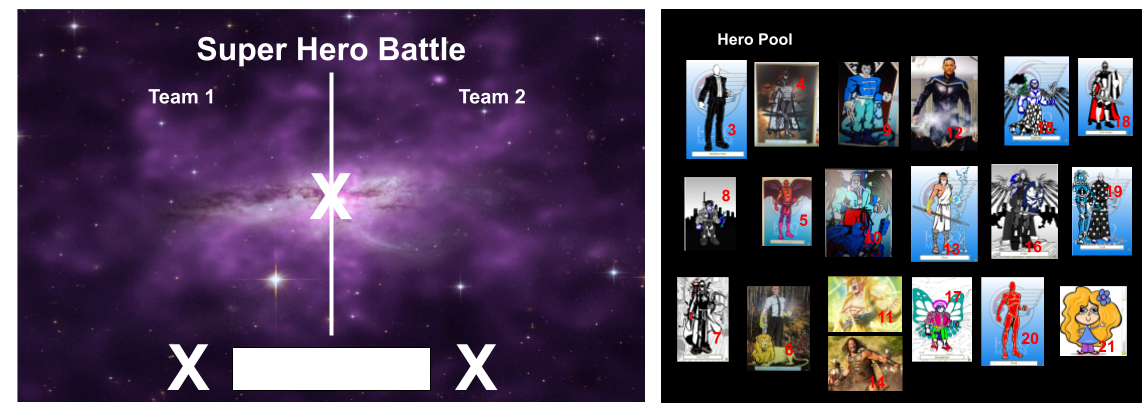
They were not not happy when we first made it as there was only 6 Super Heroes to choose from. So they made ( and found ) more!!
To play the game, you use the random number generator on the site to choose 2 opponents on each team. They then have to work out who would win.
The Super Heroes are multiplied together so the powers have to be added.
Later, they had to throw the "dice" again - 1 for multiplying, 2 for dividing, to add to the algebra use.
The random number generator on the class site was supposed to stop the cheating, so of course they found new ways to cheat.
As they had to make a copy of the battle ground in order to use it, they had control of the power numbers. Team powers were changed so that they would definitely win the battle.
This is great cheating, as knowledge of the algebra skill we were covering has to be in use for the cheating to work. I love it!!
The example here shows how the student put his on one side with a wildly exaggerated power with all the others on the other side... his working out is faultless....
+(1).png)
It has been definitely a different challenge for me to work online with a subject that is not my own.
I decided straight away to make my own Maths Google Site rather than use the one that the class teacher had already made. That would be like using someone else's planning and not doing it myself. If I was going to be invested in this class and how they were doing, then I needed to do it myself.
Link to their class site is here.
The work we are doing at the moment is algebra and we are onto multiplying and dividing powers.
The first thing that we did for this was to design Super Heroes.
Here are some links to some great online apps to do this :-
Hero Machine Link 1
Hero Machine Link 2
We posted these Super Heroes on the class blog as they were making them.
Here is an example of one of the Heroes that they made.
The next task was to use these Super Heroes in a battle, so they need to be given their powers.
The students helped me to put together this battle zone on a Google Drawing.
They were not not happy when we first made it as there was only 6 Super Heroes to choose from. So they made ( and found ) more!!
To play the game, you use the random number generator on the site to choose 2 opponents on each team. They then have to work out who would win.
The Super Heroes are multiplied together so the powers have to be added.
Later, they had to throw the "dice" again - 1 for multiplying, 2 for dividing, to add to the algebra use.
The random number generator on the class site was supposed to stop the cheating, so of course they found new ways to cheat.
As they had to make a copy of the battle ground in order to use it, they had control of the power numbers. Team powers were changed so that they would definitely win the battle.
This is great cheating, as knowledge of the algebra skill we were covering has to be in use for the cheating to work. I love it!!
The example here shows how the student put his on one side with a wildly exaggerated power with all the others on the other side... his working out is faultless....
Thursday, June 19, 2014
Having a Go with Symbaloo
I have been having my first go with Symbaloo today, by putting in my most used bookmarks.
I can see loads of potential, with embedding visual website lists / grids onto my class sites instead of just lists of links. It seems like you can make lots of different collections and name them and embed them separately.
It really appeals to my need to have visual content and not just lots of words!!
I can see loads of potential, with embedding visual website lists / grids onto my class sites instead of just lists of links. It seems like you can make lots of different collections and name them and embed them separately.
It really appeals to my need to have visual content and not just lots of words!!
Sunday, June 15, 2014
Yay...I am Certifiable!!!
I passed my last Google Educator exam today.
I have been taking the 5 exams over the last month and a bit and I took the last one, the option choice, today. You have to take 4 standard exams, sites, calendar, gmail and docs / drive and then you get to choose from a selection for the option choice. I chose the Chrome browser.
Yay!!!

I have been taking the 5 exams over the last month and a bit and I took the last one, the option choice, today. You have to take 4 standard exams, sites, calendar, gmail and docs / drive and then you get to choose from a selection for the option choice. I chose the Chrome browser.
Yay!!!
Monday, June 9, 2014
Using Google Sites in DVC
We had some fun in the Level 1 and 2 class today making a visual and audio cartoon strip about using Google sites in the class.
This is part of some presentation work we are putting together for the research group, but we had a lot of fun acting it up for this one.
Here is the visual of the cartoon strip....

Here is the audio track that we recorded to go with it.....
This is part of some presentation work we are putting together for the research group, but we had a lot of fun acting it up for this one.
Here is the visual of the cartoon strip....
Here is the audio track that we recorded to go with it.....
Sunday, June 8, 2014
The Design Process
The design process is an interesting framework. It doesn't actually matter where you start in it and all the parts help support the others.
You can start with evaluating the final design work of others (an existing product, for example), work out the positives and negatives and use that to formulate a problem/situation to work to.
You can start with a wide range of concepts on a theme and with the feedback from clients / interested parties, write specifications that can guide the design brief.
I am guilty of always working this process in a linear manner in the classroom, starting from a situation / problem and working through to the end evaluation. It might be interesting with the seniors to mix it up and start in the middle, with some product testing at the start of a project. The Level 1 mobile phone project coming up later in the year might be an ideal place to give this a go and that group has a really good "give it a go" attitude.

Friday, June 6, 2014
Stop Motion Animation with Lego Movie Maker
 I have downloaded an app on my iPad called Lego Movie Maker and I gave it a go today in my continuing experiments in animating lego characters.
Link to the app here.
It was really easy to set up, just give your project a name and you were away. What I liked about it especially is the fact that it gives you an "onion skin" of the last shot you did, so you can position your next movement more accurately.
You can take shots really easily by touching anywhere on the screen and when you are finished, it can save out to the camera roll of the iPad so it is available for upload and sharing.
Here is my second attempt today, with "help" from Eric and Malcolm who couldn't resist offering advice!!
These are silent first experiments. The app allows you to add sound effects that are preloaded or you can record your own sounds, so this will be my next direction.
Tuesday, June 3, 2014
Focussing on the Positive
As a school, we are focussing on PB4L - Positive Behaviour for Learning, and we have recently had an opportunity to go to some Functions of Behaviour workshops.
I have been trying to put some of this into practice recently as I have a new Year 10 group on their Technology rotation.
Some of the points that I have been trying to include in these first few lessons are :-

I have been trying to put some of this into practice recently as I have a new Year 10 group on their Technology rotation.
Some of the points that I have been trying to include in these first few lessons are :-
- building up and complementing the positive behaviours
- highlighting really good work
- highlighting good attitudes
- ignoring the off task behaviours ( this one is killing me !! )
- getting close to the students who are off task and chatting with them quietly about their work
- giving quiet "thumbs up" signals to students who are just getting on with their work, when I catch their eye
Things that I have changed from my original scheme of work to accommodate this class (we are only week 2 into the new rotation so far) :-
- We are still drawing, instead of being online yet, as they seem to like drawing.
- The spider diagram of ideas for a lift the flap book are being drawn instead of being done on a Google drawing, as they like drawing. We are then scanning them in as they complete them and adding them to a Google Plus album.
What I have found :-
- Students who are off task are getting back on track by about half way through without me nagging them as they are seeing the rest of the class doing it. (This is about 2-3 students out of a class of 20). If I am being honest here, this is the part that I am finding the hardest to do. This ignoring the off task behaviour and not making an issue of it is difficult, but as I am finding that the feeling in the class is calm because of this, I will keep this in my head and keep going!!
- Students are telling their maths teacher, who they get before my lesson, that they are excited to be going to Graphics. That is good and I want this to continue. Another good reason to keep my wobbles to myself and keep moving forewords. I want Year 10 students to enjoy my subject if I want them to consider it at Level 1 next year.
- A calm lesson with some very nice work being produced so far.
- A calm and easy tidy up at the end.
- The students are getting their folders straight off the front table as they come in and are sitting down and getting on with it without being told anything.
I am finding these lessons enjoyable, because I am not nagging at them, but really tiring as I am "ON" for the full time. When we (the class and me) get into a routine, I am sure it will be easier, but I really am not minding at the moment as I am not ending each lesson struggling and I hope it will continue that way.
Sunday, June 1, 2014
Stop Motion Test 1
After going to see the Lego movie, I have been inspired to have a go at stop motion animation again. I have not had a serious play with this since I was at University, and I made a plasticine movie with an old super 8 cine camera. Then, I had to wait for the movie to come back from processing in the post for me to see what it looked like. Next, I had to feed it up onto the cine projector that I had picked up from a second hand camera shop in Sunderland.
Today, this test took such a short time from making to viewing, it was great. I went shopping for some Lego yesterday and had great fun this morning making up the little set that I bought. For the test, I decided just to try and make the character walk.
I set up a small digital camera up on a little tripod and I was away straight away.
My first thought was to move each leg one at a time to make him walk. This proved a no go as the balance of the Lego man would not allow it ( note to self - get some blue tac!! ), so for this test I just shuffled him from side to side.
The bit that proved frustrating was using iMovie 10. It was easy enough to set the project to have no "Ken Burns" on each photograph, but I could not find where to set the time for each one. I ended up doing each photo individually, which was not too bad today as there wasn't many photos in this short test, but for the future, I must find out how to do this in bulk.
Today, this test took such a short time from making to viewing, it was great. I went shopping for some Lego yesterday and had great fun this morning making up the little set that I bought. For the test, I decided just to try and make the character walk.
I set up a small digital camera up on a little tripod and I was away straight away.
My first thought was to move each leg one at a time to make him walk. This proved a no go as the balance of the Lego man would not allow it ( note to self - get some blue tac!! ), so for this test I just shuffled him from side to side.
The bit that proved frustrating was using iMovie 10. It was easy enough to set the project to have no "Ken Burns" on each photograph, but I could not find where to set the time for each one. I ended up doing each photo individually, which was not too bad today as there wasn't many photos in this short test, but for the future, I must find out how to do this in bulk.
Wednesday, May 28, 2014
Learning to Podcast in Our after School PD Session
Our after school PD sessions kicked off again today and I have decided to do a few weeks of unplanned sessions where people can pop in and cover what they need to.
This proved interesting today when Carol, our Food Technology / Catering and Hospitality teacher came and we ended up doing podcasting.

This proved interesting today when Carol, our Food Technology / Catering and Hospitality teacher came and we ended up doing podcasting.
She wanted an interactive way that students can be involved in the recipe process.
So the original plan is that Carol will make a podcast of the ingredients, using Garage Band, so the students have to listen to the instructions. With it being in podcast from, they can listen as many times as they need to. She will then embed this on her site, via Sound Cloud, where she will combine it with a Google form where the students have to fill in the method.
Carol then plans to move on to the students doing the whole process them selves.
We had a lot of fun today, recording the voice tracks, putting in jingles and adding illustrations of the recipes.
Friday, May 23, 2014
Climbing the SAMR Ladder
We have been involved in an interesting activity at school recently where we have been looking at what we are doing in our teaching practice regarding online learning. Part of that assessment process involved looking at the activities that we are doing and where they fit onto the different levels on the SAMR ladder.
Here is what I thought that I could put on each stage of this ladder. This table is part of the from that the school gave us to fill in. We had to put our input into the last column.
This was a really interesting activity to do and it made me really think about the activities that I have designed for the students to work through. I need to get more of the DVC work up into the redefinition area, as this is also a golden opportunity to get the work into the extended abstract of the SOLO progression which will get the students to extend their thinking and get outside of that box. We still need to produce work on paper as those key drawing skills are vital to design work, but how can I get them to produce the other work we get to do in innovative and interesting ways so it inspires them in the course rather than is a chore.
This is a great link from GettingSmart for an interactive SAMR ladder.

Here is what I thought that I could put on each stage of this ladder. This table is part of the from that the school gave us to fill in. We had to put our input into the last column.
Level
|
Definition
|
Example
|
Evidence (Link)
|
Substitution
(Enhancement)
|
Technology acts as direct tool substitute, with no functional change.
|
Examples may include; digital copy of notes/handbooks.
|
All of the instructions and resources are stored online rather than on paper.
Everything that I used to give the students on photocopied handouts is now on the site for them to reference.
|
Augmentation
(Enhancement)
|
Technology acts as direct tool substitute, with functional improvement.
|
Examples may include; use of google forms for pre/post tests etc. Use of go animate/glogster/ collaboration using Teacher Dashboard.
|
Use of gafe products for various collaborative/group activities. These activities have been enhanced by being able to collaborate with each other online and by getting quick teacher feedback.
|
Modification
(Transformation)
|
Technology allows for significant task redesign.
|
Examples may include;
gamification/
animated tasks/use of google maps/video.
|
Level 1 layout exercise - analysing each others work in a Google Plus community. The students upload their design work to the community and allow others to comment on it. They take the comments of others to structure the analysis of their own work.
|
Redefinition
(Transformation)
|
Technology allows for the creation of new tasks, previously inconceivable.
|
Examples may include; cross curricular/virtual tours/Google+.
|
Level 1 online course - mooc style - no classroom input at all.
I have made an online module to test the validity of a totally online course so the students access it and complete it in their own time.
|
This was a really interesting activity to do and it made me really think about the activities that I have designed for the students to work through. I need to get more of the DVC work up into the redefinition area, as this is also a golden opportunity to get the work into the extended abstract of the SOLO progression which will get the students to extend their thinking and get outside of that box. We still need to produce work on paper as those key drawing skills are vital to design work, but how can I get them to produce the other work we get to do in innovative and interesting ways so it inspires them in the course rather than is a chore.
This is a great link from GettingSmart for an interactive SAMR ladder.

Tuesday, May 13, 2014
Students as the Teachers
Over the past couple of years, I have noticed that my knowledge of using all the Googly stuff gets stuck into my head much more as I have to show others how to do it. I have also found that the action of making the how to screen casts, where I have to be really clear about the process, has been really beneficial to me in my own clarity and understanding.
This term, I decided to try this out on my Level 1 class and get them to make a "how to" instruction set about something they had just learned.
We have been learning how to render a few different surfaces, like wood and plastic.

This term, I decided to try this out on my Level 1 class and get them to make a "how to" instruction set about something they had just learned.
We have been learning how to render a few different surfaces, like wood and plastic.
They had a practice through the process of a couple of the techniques, then they had to decide which one they were going to use as their example of a teaching how to.
I made them a quick example to show them how I wanted them to set it out using a Google slide show. This was also a good time to show them the new crop feature in Google slides, which they were delighted with.
I didn't put any written instructions on my example, so we had a class discussion about what possibilities they could put on each slide to explain the process to someone who didn't know what to do. Their growing experience with these class discussions meant that they quickly came up with some good ideas as a class, without too much fuss.
I feel it was a useful exercise for the students. One of their internal assessments is how they render their designs within a project (AS91066 - Use rendering techniques to communicate the form of design ideas), so they need lots of practice with the techniques. If they can get the steps firmly in their head by teaching someone else, then they can concentrate on improving their techniques through practice.
Saying of the lesson through all this has been :-
Practice makes better...
Here are their how to's....
Monday, May 12, 2014
Blended Learning and the effects on a Secondary Timetable
As part of my blended learning research this year, I am interested to know what kind of effect this type of learning has on the timetable and planning in a secondary school context.
I have interviewed Mr Harris, Deputy Principal at Tamaki College, in charge of timetabling. I sent him the questions a couple of weeks ago so he knew what I was going to ask him.
These are the questions that we covered ( along with a few extras along the way ).
What the main points were :-
Here is the recording of the interview ( please excuse the small chat at the start !! The main section starts about 50s in... )
I have interviewed Mr Harris, Deputy Principal at Tamaki College, in charge of timetabling. I sent him the questions a couple of weeks ago so he knew what I was going to ask him.
These are the questions that we covered ( along with a few extras along the way ).
- What do you see as the main issues with the timetable as it stands at the moment?
- How do these issues affect the planning of a whole school timetable?
- What is your understanding of blended learning?
- Have you seen blended learning in action at any other school?
- Were there any timetable considerations with what you have seen?
- When the wireless in the community is up and running, and nearly all students will therefore have internet access at home, do you see more of an opportunity for blended learning to have an impact on timetable planning?
- What do you see as the main stumbling blocks / sticky areas with a blended learning model with regards to timetable planning?
- There are definitions of types of blended learning here - Link
- Do any of these models make timetable planning easier? ( bearing in mind, we still have to cater for trades, junior school and intermediates, who need a more traditional model ).
- I see DVC as blended due the the different types of activities that we have to do, both online and on paper.
- Do you see all subjects in the school like this or are some more able to be totally digital and others not?
- How does this affect the planning of a timetable to cater for these differences?
- This link here is to a totally online Level 1 course that I am trialling this year.
- Link to Site
- I am trialing it with a group of Year 10 students.
- If there were more online course opportunities like this, how do you see this affecting the timetable?
- What are the positive and negative affects that this could have?
- Do you ever see a time when the students determine the timetable for themselves, going to see teachers when they need to for specific skills and content and for discussion time during a course where most of the “facts / content” is online?
- Do you think that this approach is too “mature” for our younger students?
- How do you see that a secondary timetable is going to have to evolve to keep up with the changes in how content is being taught?
What the main points were :-
- What, where, when and who ?
- What is going to be best for the students and the way that they learn?
- How much change can happen while the end assessment is still as it stands with NCEA and we have to prepare students for that reality?
- Being prepared for a future where we don't know what it will be like, as things are always changing. Wireless in the community will be a bog step in this change, as our expectations of the students ability to work outside of school hours will be different.
- Being OPEN to change and being able to adapt and cater for what the students needs.
- Teachers work at different rates, styles and times so we need to expect and cater for students in the same way.
- Will students come in for those skill sessions that they need, and have a more flexible timetable at other times? What will that flexible arrangement look like?
- Yes, he does see a time when students are dictating the timetable, but when that will be is unclear in the present state of things.
- As more students come through from primary and intermediate having gone through this style of teaching, their ability to cope with a more open time table will improve, so the "maturity" factor will not be relevant any more.
- Each subject has different requirements, and topics within a subject has too, so a one size fits everything will not be the way to go, but a flexible approach will be necessary.
Here is the recording of the interview ( please excuse the small chat at the start !! The main section starts about 50s in... )
Friday, May 2, 2014
Google for Education
After listening to all the training options available at the GAFE Summit NZ this week, I decided to make a start.
I went through the basic exams yesterday, and have completed the level 1 certificate.
I have now made a start working my way through the first Level 2 set (about Docs and Drive) and am aiming towards the Google Educator exams.
Link to the Google for Eduction site here.
Great resource site from the GAFE Summit here.

I went through the basic exams yesterday, and have completed the level 1 certificate.
I have now made a start working my way through the first Level 2 set (about Docs and Drive) and am aiming towards the Google Educator exams.
Link to the Google for Eduction site here.
Great resource site from the GAFE Summit here.
Thursday, May 1, 2014
Be More Dog...
This week I have had a great time at the GAFE Summit NZ North Island.
The summit was a two day event this time round, so there was lots of choice of great things to go and listen to.
We kicked off with a keynote from Suan Yeo.
Here are my highlights from his keynote speech :-
How to Make your Google Site not look like a Google Site with Ken Shelton
The main starting points are :-
Google Art Project with Jim Sill
I didn't take many notes here at all as I was too busy playing, but these links are well worth a visit as the Google Art Project is AWESOME. The 1giga pixel photographs are AMAZING, you can get SO close to the paintings, you can see the canvas structure and individual brush strokes.
Collaboration - Concept, Power and Magic with Julie Lindsay
Google Docs - The Ultimate Workflow and Applications Suite with Ken Shelton
What can you do in 2 steps that used to take 7?
But, we all need to :-
The summit was a two day event this time round, so there was lots of choice of great things to go and listen to.
We kicked off with a keynote from Suan Yeo.
Here are my highlights from his keynote speech :-
- A lot of the content on the net is repurposed and re-imaged - how can you make the content say what you want it to say.
- Start with why.
- Do schools kill creativity.
- Children are born inquisitive.
- Sometimes you win, sometimes you learn.
- Shift from students as consumers to students as creators.
- The sign up rate for MOOCS is HUGE.
- MOOC like reading the newspaper.
- You pick what you want to learn when you want to learn it.
- Ask questions that can’t be Googled..
- Flip the teacher - get the students to lead the class for the day.
- Plan for the last mile not the first
- Let technology do the hard work.
- Computational thinking - problem solving - the steps are important not so much the answer.
- Internet Explorer - the best browser for downloading a better browser ( !!! )
Then the sessions started and it was all on, finding the rooms and settling down to 8 sessions of Googly learning.
Here are my highlights of the two days :-
The sessions were hands on / having a go so my notes are short and bullet point style.
Playlists - Curating YouTube with Jim Sill
This was a great, useful session where I learned lots of really good stuff that I can apply and share.
- You need an account for a playlist on YouTube.
- When you subscribe to stuff it teaches google what to recommend.
- You can click on these to stop them being shown - the three dots - but you can't get rid of recommended ones so use your personal account for the silly stuff, then it won’t show up on your work account for google to recommend from it.
- Deleting the search history will delete all the things that guide the recommendations too.
Watch on full screen - you loose all the controls.
Large player - pushes all the other on screen stuff out of view - you can still use all the controls.
Safety Mode :-
- Down the bottom - it says safety mode - gets rid of comments from the screen.
- Limits recommended videos to a certain type of rating. - links to what you are watching.
- You can push safety mode out to all chrome books on the control panel.
- for example - Sesame street video - all the recommendations are of the same TV rating of the show you are watching.
Subscription - you can set it up to email you when new ones are added - but the normal setting will just include it on your feed when you log in.
You can set the video up to play from a certain spot - this changes the url link to accommodate this setting.
Add to - playlist.
You can share playlists across users / sign ins
Add to playlist or start a new playlist.
- Public - anyone can find it
- Unlisted - need the link can’t be searched for
- Private - is private
There is a button that says remove duplicates - useful
When you play one from a playlist - it will continue on and play the rest in a loop.
You can drag and drop the order that they are in.
The share option on the playlist shares the whole playlist, not just one of the videos.
Embed code - embeds the whole playlist.
It does not show recommended videos at the end , it automatically goes onto the next one then shows a curly arrow to refresh.
- Click on enable privacy enhanced mode to embed the playlist on a site.
Hover over the vid in the playlist, for lots more options.
- Can edit start and end times - trim up the front and back of video - doesn’t effect the vid on the web, just what appears in your playlist.
- Can add notes / instructions
- On the upload button you can record straight from the web cam.
- You can record instructions in the playlist and mix it into required trimmed videos.
Get students to snip and edit up playlists to show their understanding of a topic.
- Use the filter drop down to guide searching.
- Use a comma and add playlist to a search - you will only get playlists on that topic.
The main starting points are :-
- navigational structure
- page layout
- look and feel - colour, typeface etc..
Get to your content in no more than 2 clicks.
- Why? get to important info quickly.
- The more clicks the faster the user experience declines.
Web pages are set up in tables.
This creates a frame for the content - you usually don’t see this frame.
1200 px is a fairly good standard browser size for the width of your site.
Have the tabs as category titles so this makes it more obvious there are drop downs under them. People will then find it natural to go to the drop downs to use them.
- Layout - Keep it simple, keep it clean.
- Page layout based on the content.
What colour is your personality?
Colour - emotion, temperature, symbolise.
Create an account in colour lovers to save your colour schemes in.
Take photos of products that have colours that inspire… use photoshop or pixlr to get the hex codes and create a colour palette.
Serif / san serif
serif - print
san serif - web as there is more space
Do not use Comic san!!!
Tab titles - use a serif font as there is less space
Being able to take tours and walks around galleries all round the world is an opportunity not to be missed. You can loose a LOT of time browsing though this project.
ISTE.org
You can’t expect students to collaborate if teachers don't model it
- Synchronous - in real time
- Asynchronous - out of time, the glue that holds collaboration together across all sorts of groups.
Cooperation + Contribution = Collaboration
- Contribute is the one that sometimes gets lost in the mix
- + co creation - what are you going to do together?
It is not always about you and your work, it is about the final thing that you are working on together.
voicethread.com
How are we supporting collaboration online?
Potential for miscommunication
- Can you use tools other than google docs for collaborative learning, to build on the comfort level issues of working only through online methods - skype?, chat?, forum?
poll everywhere - free account takes first 40 answers
What can you do in 2 steps that used to take 7?
Have drive in grid view and colour the folders for instant recognition.
Thumbnails of files.
Autosave is every three to seven seconds
Develop an efficient naming protocol for documents.
Name, class, title - these become searchable terms.
Put a header on the doc and use #name, class, title - this is then searchable too
Create searchable identifiers
My Session doc - contains lots of great pointers for using the research tool in Google docs.
I have learned LOADS of great stuff over the 2 days and the plan now is to start breaking it down and working out how I can use it and how I can share it with others.
Lots to do !!!
But, we all need to :-
BE MORE DOG!!
Embrace the experience!
Grab the frisbee!!Thursday, April 17, 2014
The 10 Commandments of Typography
The 10 Commandments of Typography
A great graphic found on Visual.ly.
The original can be found here from DesignMantic.

A great graphic found on Visual.ly.
The original can be found here from DesignMantic.
Wednesday, April 16, 2014
Analysing Design Applications
I took the second day today of the 8 Manaiakalani research days that I can have this year.
I decided to use it to try and assess and analyse some online design apps and I decided to get a small group of students to help me to do this.
I sent them all this document with a selection on online programmes and chrome apps for them to test and try out. They had to try and design something with these tools and see how easy they were to use.
Link to document
Between them they had Asus netbooks, Samsung chrome books, and we used PC desktops and Apple desktops.
They had to see if the apps we were looking at could be used on a variety of devices to make sure they were useable for lots of different situations.
Here is a link to the students' analysis sheets that they filled in as they went.
Here is Fiu, being comfortable on a beanbag set up on 3 chairs, testing out the same app on a desktop and a netbook.


I decided to use it to try and assess and analyse some online design apps and I decided to get a small group of students to help me to do this.
I sent them all this document with a selection on online programmes and chrome apps for them to test and try out. They had to try and design something with these tools and see how easy they were to use.
Link to document
Between them they had Asus netbooks, Samsung chrome books, and we used PC desktops and Apple desktops.
They had to see if the apps we were looking at could be used on a variety of devices to make sure they were useable for lots of different situations.
Here is a link to the students' analysis sheets that they filled in as they went.
Here is Fiu, being comfortable on a beanbag set up on 3 chairs, testing out the same app on a desktop and a netbook.
In the afternoon, we decided to try out some iPad apps.
Here are the ones that were tested and tried out :-
Homestyle 3D
A big hit was the Tayasui sketches app as it was easy to draw with and very realistic looking when you are sketching.
Doodle Buddy was popular but maybe not detailed enough for the higher levels in design work.
Autodesk always provides good design tools and it is good to see them available in an iPad format.
Overall, a very productive day with some good outcomes and some disappointments. A key question came through. How can a really good app like 3D Design Something, which we all rated as really good and easy to use and is totally online, not work on the netbook? Frustrating.
The iPad app test has made me want to use the iPads in DVC so I need to go shopping for some stylus pens.
 |
| Mino and Jarna working hard |
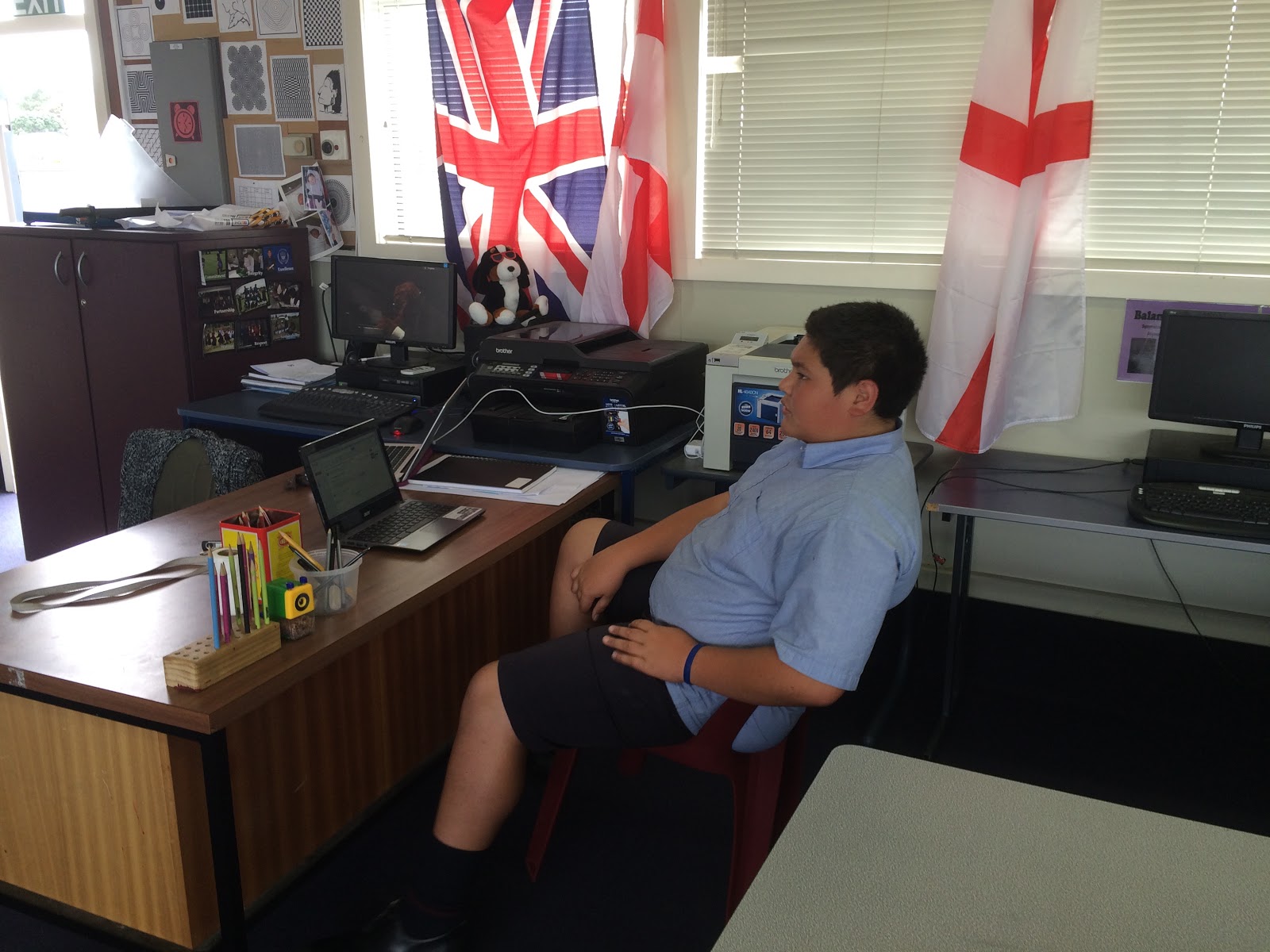 |
| Nathaniel trialling apps and giving feedback |
Pizza for lunch. Have to feed the troops...
Subscribe to:
Posts (Atom)